Posts Tagged ‘Crash’
Posted by William Diaz on November 19, 2010
The term corruption gets thrown around way too-often without actually knowing what it means or how it happens. If you troubleshoot Word often, all of us at one time or another have had to delete the Word Data key from the Windows Registry in an attempt to correct some problem. But what are you actually doing when you delete this key? To get an idea, visit the Word MVP site and read this: http://word.mvps.org/faqs/customization/DataKeySettings.htm
You should also familiarize yourself with the following Microsoft KB Article that covers the Word data key and a few other keys: http://support.microsoft.com/kb/921541
If you bother to look at the registry values you will see they are unreadable,but if you open the Settings REG_BINARY and scroll down you will see readable text, which contains, among other things, data to Word .dot files.
When we say that the Word data key is or may be "corrupt" this could mean that information here is referencing non-existent/moved data or problem add-ins, like templates. In fact, to demonstrate what a corrupted Word data key can do, I opened both REG_BINARY types and edited the data by typing gibberish into them. When done, I opened Word and produced the following:

Posted in Troubleshooting | Tagged: Crash, Word | Leave a Comment »
Posted by William Diaz on October 13, 2010
It doesn’t surprise me when Internet Explorer crashes. Instead, I remain calm and collected (most of the time). I don’t expect the average person to know why or how it happened and I expect them to take the opposite approach and be fed up with IE. But with everything that’s happening with the endless number of add-ons that it needs to support and the dynamic nature of web content, it’s amazing it works more often than not. So, here I was asked to explore the latest case of IE crashing. Our user has logged into an online document collaboration site. They need to open and print several dozen documents. About half the time, the client is interrupted by the following error before IE crashes: “Microsoft Visual C++ Runtime Library. Runtime Error!.. iexplore.exe. abnormal program termination”

Read the rest of this entry »
Posted in Troubleshooting | Tagged: Crash, Dump, Internet Explorer, WinDbg | Leave a Comment »
Posted by William Diaz on October 12, 2010
She called me one day. I had no idea who she was. She was in one of our local offices and someone told her I was the crack desktop support tech to speak to cause “he knows a lot.” This is true, no doubt, and I’m honored some people think this highly of me. Since then, she has called me over many an issue, and in particular turned me on to what has become a known bug between Internet Explorer, a 3rd party toolbar application we use for tracking time (LexisNexis for the benefit of search queries for this in my SharePoint blog), and shipper’s tracking website. This would happen while trying to print shipping labels via Internet Explorer. Yes or No would crash IE. The error would often present itself as the following: “Runtime error. Corrupt block/Unknown block type freed. This is probably caused by freeing a static variable or bad pointer. Do you want to GPF?”
 Read the rest of this entry »
Posted in Troubleshooting | Tagged: Crash, Dr Watson, Internet Explorer | Leave a Comment »
Posted by William Diaz on August 24, 2010
Very rarely do I ever experience a Blue Screen of Death. In fact, I can’t recall the last time I did, so it was worth taking a photo of:
 Read the rest of this entry »
Posted in Troubleshooting | Tagged: BSOD, Crash, Dump, Process Monitor | 2 Comments »
Posted by William Diaz on August 11, 2010
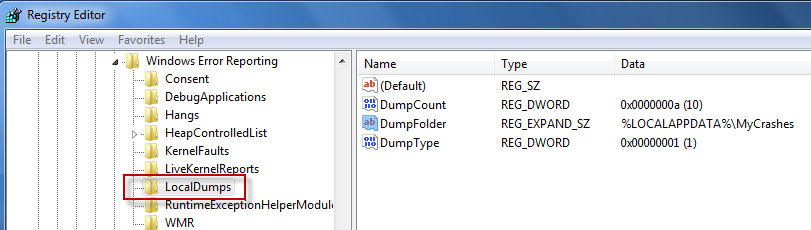
Windows Vista and 7, unlike Windows XP, do not come enabled with a post-mortem debugger out of the box . But you can enable crash dump archiving by editing the Windows registry.

The crash dump will be created in \Users\UserName\AppData\Local. To change the destination, modify DumpFolder to the desired path.
Alternatively, if the app errors and the process remains running until the error message box is dismissed, you can use the Windows Task Manager to manually dump the process by right-clicking it and choosing Create Dump File.

See this MSDN article here for more details.
Posted in Inside Windows | Tagged: Crash, Dump | 3 Comments »
Posted by William Diaz on July 21, 2010
We see numerous complaints about missing printers. This will happen when the Windows print spooler (spoolersv.exe) is not running and we often see this complaint with those setup with personal HP 1020/1022 printers. While attempting to print PDFs, or after printing PDFs, the print spooler is crashing. The drwtsn32.log and user.dmp files in C:\Documents and Settings\All Users\Application Data\Microsoft\Dr Watson all point to the same culprit, the HP ZSR.dll print driver.mHere is an excerpt from the drwtsn32.log: Read the rest of this entry »
Posted in Troubleshooting | Tagged: Crash, Dr Watson, PDF, Printing | Leave a Comment »
Posted by William Diaz on July 18, 2010
In cases where the post-mortem default debugger, e.g. Dr Watson in XP, fails to capture a user mode dump of a crashing process or service, you need to be a bit proactive and attach to the crashing application. You can do this a number of ways, such as using ADPlus or WinDbg from the Windows Debugging Tools, but this may not be practical on a user’s workstation (big foot print, invasive, process does not run transparently). Also, the crash may be too random to recreate quickly or at will.
In these circumstances, Debug Diagnostics comes in very useful. It has a small foot print, runs as a Windows service, can be quickly setup via rules, and the GUI can then be closed and left to wait for the target process to crash. Afterwards, a dump can be retrieved from the system remotely, and impact on the user remains minimal. Additionally, Debug Diagnostics can also analyze the dump created and find a solution on-line.
Outlined is a basic setup, attaching Debug Diagnostics to crashing instances of Internet Explorer. In the example here, I am creating a crash rule for a specific process:
Posted in Troubleshooting, Troubleshooting Tools | Tagged: Crash, Dump, Hang | 1 Comment »
Posted by William Diaz on July 7, 2010
One afternoon I had the luck of encountering a user who was experiencing random Outlook crashes while. As far as he was concerned, there didn’t seem to be any rhyme or reason to it. He would just be clicking through email messages and then, suddenly, he would encounter the following error (but not always): “Inbox – Microsoft Outlook: OUTLOOK.EXE – Application Error – The exception unknown software exception (0x…) occurred in the application at location 0x…“
 Read the rest of this entry »
Posted in Troubleshooting | Tagged: Crash, Dump, Outlook, WinDbg | 1 Comment »
Posted by William Diaz on July 4, 2010
After moving to a new Internet Explorer based employee time management system, I started noticing a slew of reports coming in where IE was crashing when trying to access any of the menus within the browser. The error always presented itself as: “Microsoft Visual C++ Runtime Library. Runtime Error!..”

Posted in Troubleshooting, Troubleshooting Tools | Tagged: Crash, Dump, IE, Process Explorer, WinDbg | Leave a Comment »
Posted by William Diaz on July 2, 2010
Some time ago we started to see a rash of complaints where Internet Explorer was crashing while visiting certain sites. Even though we were still largely a mix of IE6 and IE7, I had no problem reproducing the crash with IE8. The error message was rather vague (they often are) and didn’t offer any details as to what was the cause or how to troubleshoot: "IEXPLORE.EXE – Application Error – The Instruction at … referenced memory at … The memory could not be ‘read’":

Posted in Troubleshooting, Troubleshooting Tools | Tagged: Crash, Dr Watson, Dump, Internet Explorer, Networking | 1 Comment »



 Windows Explored