

I haven’t come across these too many times, but every now and then a user will receive one of these and not have a way to view from Windows. I took a look for some printable strings in one of these .pages files and could see the universal compression signature within, PK:
 Read the rest of this entry »
Archive for the ‘Uncategorized’ Category
View .Pages Files Without A Mac
Posted by William Diaz on January 4, 2012
Posted in Uncategorized | Leave a Comment »
Exploring IE’s Form Data
Posted by William Diaz on December 22, 2011
A while back I was troubleshooting a user complaint about disappearing form data in Internet Explorer. This provided me a chance to explore some of the internals of IE and how it handles this data. Form data is AutoComplete information that is stored locally on your computer to make it more convenient to input commonly used data into forms in web pages. This information can be username logins, passwords, and other common fields like First Name, Last Name, Address, etc…
To begin, Forms data is enabled or disabled from from Internet Options > Content > AutoComplete:
Read the rest of this entry »
Posted in Uncategorized | Tagged: Internet Explorer | 1 Comment »
What Does File Contention Look Like?
Posted by William Diaz on December 20, 2011
Every now and then someone calls in and complains about terrible performance. Often times, the tech handling the call will try to recover performance by killing CPU intensive processes or closing unused applications1, especially those with large memory footprints2. More often than not, though, the issue can be described as file contention, a condition where performance is “penalized” because the disk cannot keep up with file IO demand.
In the example here, an unexpected virus scan kicks off in the background (these are usually scheduled to run after hours), and examining the two most common aspects of system activity, processor and memory, the workstation is well within the envelop of what is considered acceptable and the technician is left scratching his head as he tries to gauge why the system is so slow even though memory usage is minimal and CPU usage averages about 15%. I advise him to start Performance Monitor (perfmon) and connect some remote performance counters, mainly disk counters like read and write time, but most importantly average and current disk queue length:
Read the rest of this entry »
Posted in Uncategorized | Tagged: Hardware, Performance | Leave a Comment »
MMC Tips for Showing Exchange Tabs, Adding the ESM snap-in, and Speeding Up Opening of ADUC in Windows 7 64-bit
Posted by William Diaz on December 5, 2011
Missing Exchange Tab in Windows 7 64-bit
I was a bit annoyed by this when I switched my main workstation to Windows 7 64 bit: the absence of the Exchange tabs in the account properties. I have no idea why Microsoft doesn’t officially support this with the RSAT tools. To work around this, though: Read the rest of this entry »
Posted in Uncategorized | Tagged: Exchange, MMC | Leave a Comment »
An Instance Where Process Monitor Failed to Run
Posted by William Diaz on October 28, 2011
While doing some troubleshooting on a workstation one evening, I wanted to run Process Monitor but encountered the following error: “Procmon was unable to allocate sufficient memory to run. Try increasing the size of your page file.”

As seen here, the available memory and page file size were sufficient:
Read the rest of this entry »
Posted in Uncategorized | Tagged: Process Monitor | 1 Comment »
Group Policy Tab Missing In ADUC for Windows 7
Posted by William Diaz on October 5, 2011
I recently needed to look into the Group Policy tab in Active Directory Users and Computer from my Win7 workstation but it wasn’t there. Normally, I switch to my XP workstation (cause I have been to lazy to explore this missing tab … until now). With Windows 7 and Server 2008, the GP tab can only be accessed from the Group Policy Management Console. You will need to install the Remote Server Administration Tools for Windows 7 with Service Pack 1 (SP1) to access this console on a Windows 7 PC. Afterwards, enable GPMC from the Control Panel > Turn Windows features on or off > Remote Server Administration Tools > Feature Administration Tools > Group Policy Management Tools.

You can then open the Group Policy Management Console from an mmc or running gpmc.msc. Tip: add both ADUC and GPMC to the same MMC.
Posted in Uncategorized | Tagged: Windows 7 | 1 Comment »
An Oldie But Still A Goodie–Dr. Watson
Posted by William Diaz on October 3, 2011
A few years ago I started to see several complaints of Internet Explorer crashing in the course of a couple months. The error was one of the rather vague exception messages thrown at the time of the crash and didn’t allude to anything obvious. Tired of not being able to explain through any of the conventional troubleshooting methods, I did a little research into advanced troubleshooting techniques and came across the Windows XP default debugger, Dr. Watson. Sure it sounds a little cheesy but this is actually a helpful little gem that has assisted me in resolving many cases of unexplained application crashes. And even though Microsoft has done away with drwtsn32.exe in all Windows operating systems after XP, the majority of small and large enterprises are still using XP, which means it should be one of core tools of any Windows XP troubleshooting guru. You’ll also see how, despite Microsoft moving to WER, Dr. Watson can still be leveraged by the Windows Vista/7 OS (just for the hell of it).
To use Dr. Watson, you don’t need to do anything. By default, it is the default Windows XP debugger. When an application experiences a exception of sorts that leads to a crash, ideally it is designed to dump that process and create two files, a plain text drwtsn32.log and a dump file named user.dmp, the latter which requires WinDbg to open and analyze. If you are not sure if Dr. Watson is the default debugger, you can run drwtsn32.exe –i to make it the default. You can also confirm by going to HKLM\Software\Microsoft\Windows NT\CurrentVersion\AeDebug and looking in the Debugger string for drwtsn32 -p %ld -e %ld –g:
Read the rest of this entry »
Posted in Troubleshooting, Troubleshooting Tools, Uncategorized | Tagged: Debugging, Dr Watson, Dump | Leave a Comment »
virtualapp/didlogical–No, You Are Not Being Hacked
Posted by William Diaz on August 4, 2011
I came across this the other day while browsing the Credentials Manager in Windows 7: 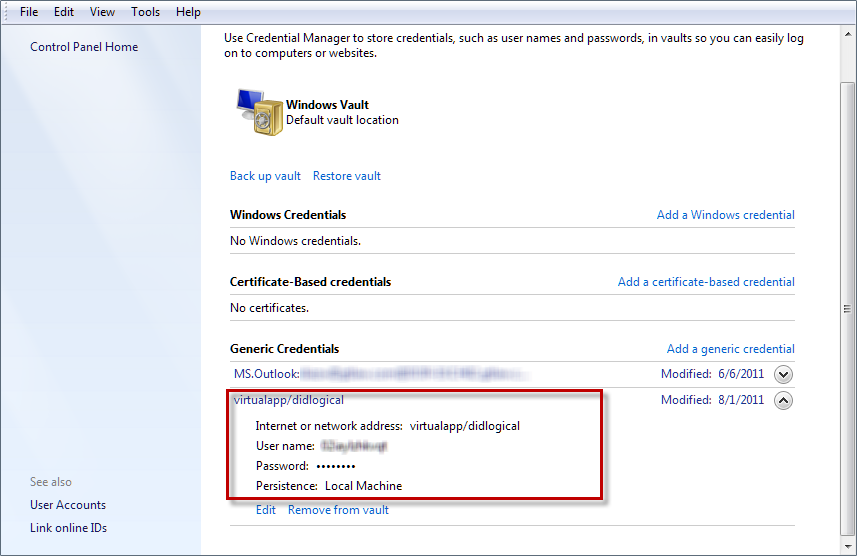
I was a bit alarmed but after a little research I found these credentials are created when you use any of the Windows Live products or Windows XP mode.
Posted in Uncategorized | 2 Comments »
Multiple Instances of msiexec.exe When C-State is Enabled
Posted by William Diaz on August 4, 2011
We recently started seeing a rash of performance issues and various program setup failures on different models of workstations. The problem can be identified as multiple instances of msiexec.exe running along side ccmsetup.exe: 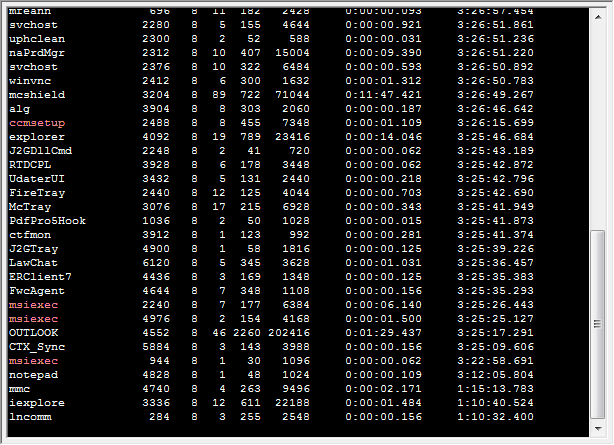
The performance issues I have seen were disk related, while others noted program installation failures. This seems to specific to McAfee HIPS, ccmsetup.exe, permissions and a setting in the BIOS for C-State. C-State throttles the cores on multicore processors based on demand. To workaround, we have been disabling the C-State option under the Performance area in the BIOS.
UPDATE
I believe his TechNet Blog addresses the issue officially: http://blogs.technet.com/b/configurationmgr/archive/2011/10/31/information-regarding-mcafee-access-protection-rule-and-configmgr-2007-ccmexec-exe-behavior.aspx
Posted in Uncategorized | Tagged: Performance | Leave a Comment »
Windows 7 Searches & Indexes Virtual Machines, Too
Posted by William Diaz on July 12, 2011
I was using mmc as the application launch criteria in the Windows 7 Start  > Search programs and files and upon hitting Enter, it kept launching Windows XP Mode. I had no idea up until this point, but Windows Search will index applications in the virtual machine. It took a couple minutes for me to realize this because normally I don’t visually scan the Search programs and files list. In this case, because there is no BlackBerry Management mmc for Windows 7, I had to install it in my XP mode virtual machine.
MMC.exe should work fine.
Posted in Uncategorized | Leave a Comment »
 Windows Explored