Windows Explored

Everyday Windows Desktop Support, Advanced Troubleshooting & Other OS Tidbits

Posts Tagged ‘Dump’

Enable Process & Service Crash Archiving in Vista/Win7

Posted by William Diaz on August 11, 2010


Windows Vista and 7, unlike Windows XP, do not come enabled with a post-mortem debugger out of the box . But you can enable crash dump archiving by editing the Windows registry.

  • Create a new key called LocalDumps in HKLM\Software\Microsoft\Windows\Windows Error Reporting (by default it points to %LOCALAPPDATA%\CrashDumps).
    • To change save location, create a new Expandable String Value called DumpFolder with a value of the desired path
    • A DWORD value called DumpCount with a value of decimal 10 will set the max number of dumps to save into this file at 10.
    • A new DWORD value called DumpType with value of 1 or 2 decides the type of dump (1 = minidump, 2 = fulldump).
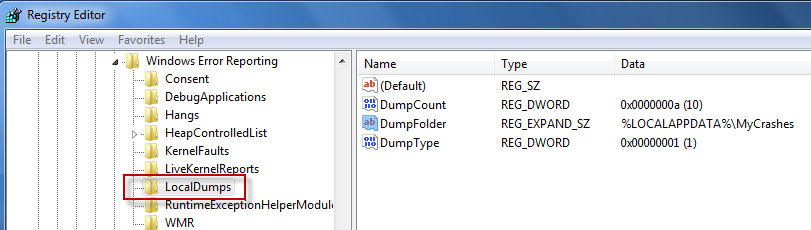
 

The crash dump will be created in \Users\UserName\AppData\Local. To change the destination, modify DumpFolder to the desired path.

Alternatively, if the app errors and the process remains running until the error message box is dismissed, you can use the Windows Task Manager to manually dump the process by right-clicking it and choosing Create Dump File.

See this MSDN article here for more details.

Posted in Inside Windows | Tagged: , | 3 Comments »

Forcing a System Crash on a Unresponsive PC

Posted by William Diaz on July 20, 2010


This one comes in handy when a Windows based PC experiences a so-called “hard hang” and you need to force it to bug check and produce a dump for debug purposes. From the Windows registry:

  • For USB keyboards go to HKEY_LOCAL_MACHINE\System\CurrentControlSet\Services\kbdhid\Parameters, create a DWORD value named CrashOnCtrlScroll equal to 11
  • For PS/2 keyboards go to HKEY_LOCAL_MACHINE\System\CurrentControlSet\Services\i8042prt\Parameters, create a DWORD value named CrashOnCtrlScroll equal to 1

You will need to reboot afterwards. A crash can now be initiated by holding down the right CTRL key and pressing the Scroll Lock key twice. Read the rest of this entry »

Posted in Troubleshooting | Tagged: , , | 1 Comment »

Using the Debug Diagnostic 1.1 Tool to Troubleshoot Application Crashes

Posted by William Diaz on July 18, 2010


In cases where the post-mortem default debugger, e.g. Dr Watson in XP, fails to capture a user mode dump of a crashing process or service, you need to be a bit proactive and attach to the crashing application. You can do this a number of ways, such as using ADPlus or WinDbg from the Windows Debugging Tools, but this may not be practical on a user’s workstation (big foot print, invasive, process does not run transparently). Also, the crash may be too random to recreate quickly or at will.

In these circumstances, Debug Diagnostics comes in very useful. It has a small foot print, runs as a Windows service, can be quickly setup via rules, and the GUI can then be closed and left to wait for the target process to crash. Afterwards, a dump can be retrieved from the system remotely, and impact on the user remains minimal. Additionally, Debug Diagnostics can also analyze the dump created and find a solution on-line.

Outlined is a basic setup, attaching Debug Diagnostics to crashing instances of Internet Explorer. In the example here, I am creating a crash rule for a specific process:

Posted in Troubleshooting, Troubleshooting Tools | Tagged: , , | 1 Comment »

The Case of the Crashing Email

Posted by William Diaz on July 7, 2010


One afternoon I had the luck of encountering a user who was experiencing random Outlook crashes while. As far as he was concerned, there didn’t seem to be any rhyme or reason to it. He would just be clicking through email messages and then, suddenly, he would encounter the following error (but not always):Inbox – Microsoft Outlook: OUTLOOK.EXE – Application Error – The exception unknown software exception (0x…) occurred in the application at location 0x…
Read the rest of this entry »

Posted in Troubleshooting | Tagged: , , , | 1 Comment »

Go Digging for the Exception

Posted by William Diaz on July 4, 2010


After moving to a new Internet Explorer based employee time management system, I started noticing a slew of reports coming in where IE was crashing when trying to access any of the menus within the browser. The error always presented itself as: “Microsoft Visual C++ Runtime Library. Runtime Error!..
122910_1941_AnotherCase1

Posted in Troubleshooting, Troubleshooting Tools | Tagged: , , , , | Leave a Comment »

The Case of the Random Internet Explorer Crashes

Posted by William Diaz on July 2, 2010


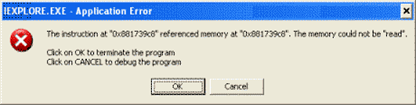
Some time ago we started to see a rash of complaints where Internet Explorer was crashing while visiting certain sites. Even though we were still largely a mix of IE6 and IE7, I had no problem reproducing the crash with IE8. The error message was rather vague (they often are) and didn’t offer any details as to what was the cause or how to troubleshoot: "IEXPLORE.EXE – Application Error – The Instruction at … referenced memory at … The memory could not be ‘read’":

Posted in Troubleshooting, Troubleshooting Tools | Tagged: , , , , | 1 Comment »