

A knee jerk reaction of mine when troubleshooting unspecified errors from users is to take a look at the Windows Event Viewer and find recent error and warning events. Often times, though, you may not see anything being reported by the operating system. It’s easy then in Windows XP to miss those generic  Information – Application Popup events in the System log: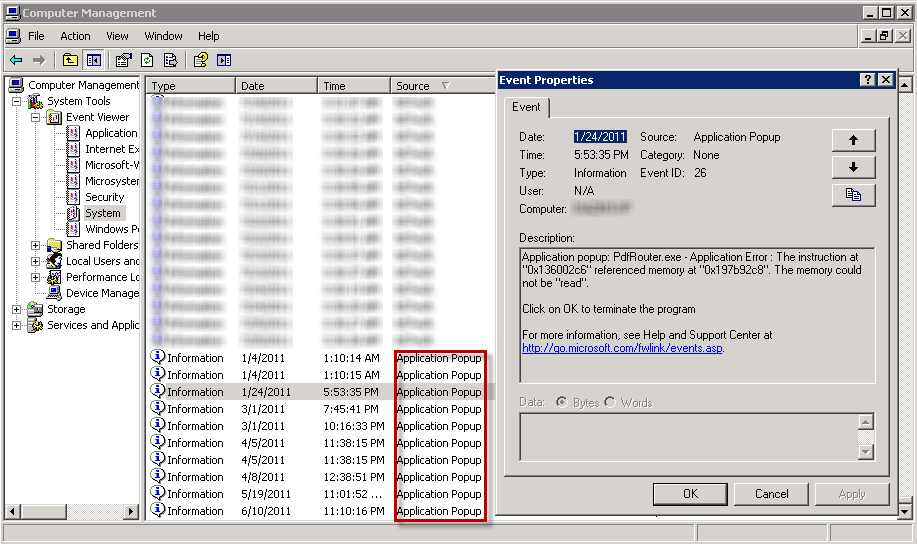
These, too, are errors and contain the text of the error encountered but may otherwise dismissed and unnoticed by the user. They may contain some important clues to the problem when you or the user are unable to reproduce the them.
When An Error Is Not Reported As An Error
Posted by William Diaz on August 1, 2011
Posted in Troubleshooting | Leave a Comment »
Sizing It Up – How Encoding Impacts Successful Message Delivery
Posted by William Diaz on August 1, 2011
Because of the way e-mail messages are encoded, several more MBs can be added to the size of a message, causing it to exceed the message send restrictions defined on the Exchange server1. As a result, there can be some confusion, since Outlook will show that the message is well below the size restrictions. For example, we cap our message size restrictions at 24MBs. However, we might have a recipient that never receives a 20MB message or is not able to send a message of the same size.
Lets take the example here where I have created a message and attached two Word documents, 10MBs and 11MBs respectively: Read the rest of this entry »
Posted in Troubleshooting | Tagged: Exchange, Outlook | Leave a Comment »
Installation Failure of the Windows Debugging Tools
Posted by William Diaz on August 1, 2011
I have run into this a few times on various workstations: “Installation Failed. A problem occurred while installing selected Windows SDK components. Unknown product: {E7F9E526-2324-437B-A609-E8C5309465CB} Parameter name: productCode.”

Read the rest of this entry »
Posted in Troubleshooting | Tagged: WinDbg | 2 Comments »
Windows 7 Searches & Indexes Virtual Machines, Too
Posted by William Diaz on July 12, 2011
I was using mmc as the application launch criteria in the Windows 7 Start  > Search programs and files and upon hitting Enter, it kept launching Windows XP Mode. I had no idea up until this point, but Windows Search will index applications in the virtual machine. It took a couple minutes for me to realize this because normally I don’t visually scan the Search programs and files list. In this case, because there is no BlackBerry Management mmc for Windows 7, I had to install it in my XP mode virtual machine.
MMC.exe should work fine.
Posted in Uncategorized | Leave a Comment »
Resolving Web Page Issues By Turning On Script Error Notifications In Internet Explorer
Posted by William Diaz on July 12, 2011
…and you don’t necessarily need to know a thing about web scripts!
My issue started when I came in one morning and went about making some aesthetic changes to one of our SharePoint pages. First, I needed to clean up some of links in the navigation pane on the left hand of the site but all I saw was this:

I should have seen all the various navigation menu heading and links like below:
Read the rest of this entry »
Posted in Troubleshooting | Tagged: Internet Explorer | 2 Comments »
Running the System File Checker From A Network Share
Posted by William Diaz on July 1, 2011
I recently found myself needing to run the Microsoft Windows System File Checker on a workstation. If you don’t already know, the default behavior is to “Insert your Windows XP Professional Service Pack 3 CD now” if that is how the operating system was installed or imaged. 
To workaround this, create a drive mapping to the network share that contains the XP installation files, e.g. \\xx-fs1\Setups\Microsoft\Windows\Windows XP\32 Bit\SP\SP3\i386. Afterwards, go into the registry and navigate to HKLM\Software\Microsoft\Windows\CurrentVersion\Setups and edit the SourcePath & ServicePackSourcePath to the new network drive: 
Posted in Inside Windows | Leave a Comment »
Socket To Me (The Case of the Failed Stock Trading Program)
Posted by William Diaz on July 1, 2011
This case demonstrates the importance of understanding basic networking components in Windows and how they work in an environment that sits behind a proxy. The methods used to uncover the culprit did not involve a detailed analysis of network traffic or using any utilities or tools that do not already come with Windows. In fact, because this was time sensitive and I was not afforded the luxury of troubleshooting afterhours, I could not rely on any of the various tools I turn to, like Process Monitor, crash dumps, or Network Monitor. Previous troubleshooting steps taken before it got me involved timely uninstall and reinstall of the Java client, an IE Reset, and upgrading from IE 7 to IE 8, all to no avail and creating irate user syndrome.
To start my analysis, I used Process Explorer to easily see which processes were involved in starting the problem application (Task Manager makes it difficult to quickly see which processes are starting and stopping). An Internet Explorer shortcut to a login page actually initiates the launching of the stock trading application, and, after logging in, two processes are spawned, javaws.exe and javaw.exe:
Posted in Troubleshooting | Tagged: Networking | Leave a Comment »
Error Installing Older Versions of Flash Player
Posted by William Diaz on July 1, 2011
I found myself needing to install an older version of Flash Player for troubleshooting purposes. After uninstalling the current Flash Player, I encountered the following error when trying to install the older Flash Player: “The installation encountered errors: The version of Adobe Flash Player that you are trying to install is not the most current version…”
 Read the rest of this entry »
Posted in Troubleshooting | Tagged: Process Monitor | Leave a Comment »
Inside Windows – Rundll32.exe
Posted by William Diaz on July 1, 2011
In an earlier blog, I spoke about Windows services and how they are hosted by svchost.exe so that functionality within these dll files can be executed. But what about non-Windows services? How do they execute functions within dynamic link libraries without the need to execute the program that it belongs to? By using the rundll32.exe process (commonly described as Run DLL as an App). An example can be easily demonstrated by opening any Control Panel extension such as the Internet Explorer options panel for IE (inetcpl.cpl).
When rundll32.exe starts, it looks into shell32.dll and launches the function (or executes the code) that is responsible for opening the Internet options panel with no need for Internet Explorer to open. You can see this by adding the Command Line column to the Windows Task Manager:
Read the rest of this entry »
Posted in Inside Windows | Tagged: Process Explorer | Leave a Comment »
Inside Windows – svchost.exe
Posted by William Diaz on July 1, 2011
Think of svchost.exe as a container for all the various services that run in Windows. An example of some these services are the Windows Task Scheduler, the DNS service, and the Plug & Play service. It use to be that all these services ran as programs (.exe) but Microsoft eventually decided to start moving all this functionality into the Dynamic Link Libraries (.dll), where they could run more efficiently. The only problem with this is that dlls cannot be launched like programs, they need to run from within an executable, hence the creation of the generic service host process.
Because svchost.exe is host to many services, you often see half a dozen or more svchost.exe’s running in the Windows Task Manager:
Read the rest of this entry »
Posted in Inside Windows | Tagged: Process Explorer | Leave a Comment »
 Windows Explored