Windows Explored

Everyday Windows Desktop Support, Advanced Troubleshooting & Other OS Tidbits

Archive for the ‘Troubleshooting’ Category

Is This What a Defective Hard Drive Behaves Like? (The Case Of The Random Workstation Hangs)

Posted by William Diaz on August 3, 2011


The nature of this problem made it difficult or impossible for the help desk to identify because there was nothing to look at that that would tell the technician what was happening when these calls started coming in. They started as a complaint of general system slowness at random times through out the day and were often being assigned to be looked at overnight, which resulted in zero findings because no one knew what they were looking for and could not experience the issue remotely. And if they did, in fact run across the issue while logged on, they could not do anything anyway because the issue of the stalled workstation appeared as a remote connectivity problem and not necessarily a local hardware issue with the workstation.

As I started to here about these issues, I became interested and kept an ear out for a user or two who was encountering the random hang. Identifying a workstation with the problem actually became rather simple because during the hang, a very specific series of events would kick off after the system resumed from the hung state. Isolating the cause, though, was a lot more involved. That’s because the nature of these issues is often software based, e.g. a system or application process was kicking off, or some low level driver was locking up the system. To assist me in that task of finding the culprit, I used a few tools, starting with the Windows XP Event Viewer, then moving to Process Monitor to collect process trace logs, WinDbg to examine manual crash dumps of the hanging system, Performance Monitor, and finally installing Windows 7 after all else failed to take advantage of its enhanced Event Tracing.

Some background. The workstation hangs for the most part coincided with the then recent deployment of new Dell Optiplex 960 and 980 workstations. The hangs were not “hard hangs”, a type of hang where the system becomes completely unresponsive and needs to be manually rebooted. The hangs being seen could be characterized as “soft” in that the workstation would eventually recover after a certain amount of time, usually between 2-5 minutes. During the hang, the mouse was still active but switching between applications was not possible and all keystrokes or commands became queued during the hang. Once the system recovered, any pending operations were executed immediately afterwards. There was no rhyme or reason to the hangs, they were entirely random and would happen several times a day while any user was logged on.

I connected to the workstations after hours and examined the event logs for anything out of the ordinary. Normally, I am looking for error’s or warnings, and I was specifically focused on the System logs, hoping to see disk warnings indicating there were bad blocks on the hard drive. Not seeing anything there, I turned to the application logs but didn’t see anything that stood out there either. Looking at the other workstation, too, did not reveal anything telling.

With nothing to go on, I turned to the generic Information events and noticed that after each reported instance of hang there were a slew of McLogEvent 257 events:

Read the rest of this entry »

Posted in Troubleshooting | Tagged: , , | Leave a Comment »

Some Strategies for Defeating Malware After the Fact

Posted by William Diaz on August 2, 2011


Here is a quick guide to some methods for defeating malware after you have been infected. I have used all of these myself (with the exception of the Desktops utility mentioned below) to successfully isolate and remove malware after it has found its way onto the computer. Read the rest of this entry »

Posted in Troubleshooting | Tagged: | Leave a Comment »

When An Error Is Not Reported As An Error

Posted by William Diaz on August 1, 2011


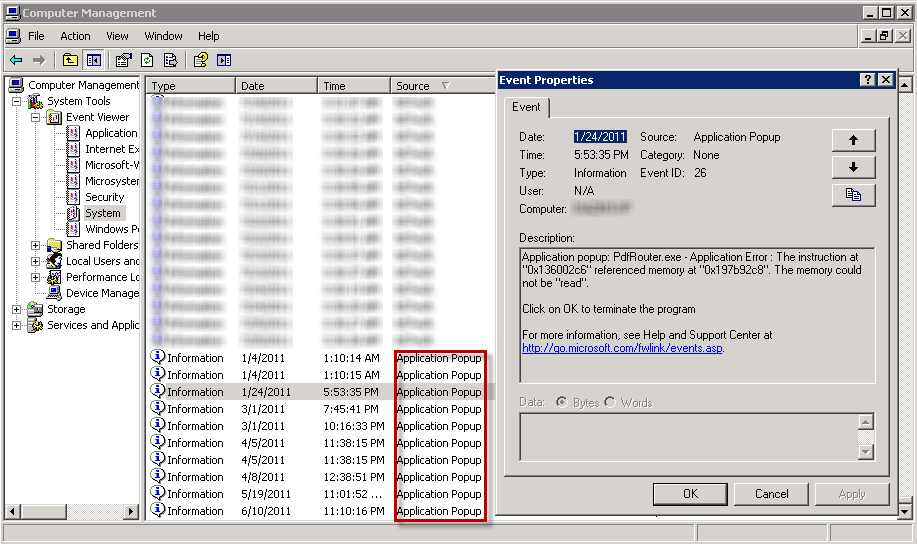
A knee jerk reaction of mine when troubleshooting unspecified errors from users is to take a look at the Windows Event Viewer and find recent error and warning events. Often times, though, you may not see anything being reported by the operating system. It’s easy then in Windows XP to miss those generic information-whiteInformationApplication Popup events in the System log:
image
These, too, are errors and contain the text of the error encountered but may otherwise dismissed and unnoticed by the user. They may contain some important clues to the problem when you or the user are unable to reproduce the them.

Posted in Troubleshooting | Leave a Comment »

Sizing It Up – How Encoding Impacts Successful Message Delivery

Posted by William Diaz on August 1, 2011


Because of the way e-mail messages are encoded, several more MBs can be added to the size of a message, causing it to exceed the message send restrictions defined on the Exchange server1. As a result, there can be some confusion, since Outlook will show that the message is well below the size restrictions. For example,  we cap our message size restrictions at 24MBs. However, we might have a recipient that never receives a 20MB message or is not able to send a message of the same size.

Lets take the example here where I have created a message and attached two Word documents, 10MBs and 11MBs respectively: Read the rest of this entry »

Posted in Troubleshooting | Tagged: , | Leave a Comment »

Installation Failure of the Windows Debugging Tools

Posted by William Diaz on August 1, 2011


I have run into this a few times on various workstations: “Installation Failed. A problem occurred while installing selected Windows SDK components. Unknown product: {E7F9E526-2324-437B-A609-E8C5309465CB} Parameter name: productCode.”
image
Read the rest of this entry »

Posted in Troubleshooting | Tagged: | 2 Comments »

Resolving Web Page Issues By Turning On Script Error Notifications In Internet Explorer

Posted by William Diaz on July 12, 2011


…and you don’t necessarily need to know a thing about web scripts!

My issue started when I came in one morning and went about making some aesthetic  changes to one of our SharePoint pages. First, I needed to clean up some of links in the navigation pane on the left hand of the site but all I saw was this:
image
I should have seen all the various navigation menu heading and links like below:
Read the rest of this entry »

Posted in Troubleshooting | Tagged: | 2 Comments »

Socket To Me (The Case of the Failed Stock Trading Program)

Posted by William Diaz on July 1, 2011


This case demonstrates the importance of understanding basic networking components in Windows and how they work in an environment that sits behind a proxy. The methods used to uncover the culprit did not involve a detailed analysis of network traffic or using any utilities or tools that do not already come with Windows. In fact, because this was time sensitive and I was not afforded the luxury of troubleshooting afterhours, I could not rely on any of the various tools I turn to, like Process Monitor, crash dumps, or Network Monitor. Previous troubleshooting steps taken before it got me involved timely uninstall and reinstall of the Java client, an IE Reset, and upgrading from IE 7 to IE 8, all to no avail and creating irate user syndrome.

To start my analysis, I used Process Explorer to easily see which processes were involved in starting the problem application (Task Manager makes it difficult to quickly see which processes are starting and stopping). An Internet Explorer shortcut to a login page actually initiates the launching of the stock trading application, and, after logging in, two processes are spawned, javaws.exe and javaw.exe:

Read the rest of this entry »

Posted in Troubleshooting | Tagged: | Leave a Comment »

Error Installing Older Versions of Flash Player

Posted by William Diaz on July 1, 2011


I found myself needing to install an older version of Flash Player for troubleshooting purposes. After uninstalling the current Flash Player, I encountered the following error when trying to install the older Flash Player: “The installation encountered errors: The version of Adobe Flash Player that you are trying to install is not the most current version…”
6-20-2011 12-47-20 PM Read the rest of this entry »

Posted in Troubleshooting | Tagged: | Leave a Comment »

Troubleshooting and Resolving a Hang in 90 Seconds

Posted by William Diaz on June 3, 2011


I’m a stickler when it comes to performance issues on my workstation. So it bothered me when I noticed a small delay when right clicking on my desktop. By small, I mean literally 2 seconds. I opened SysInternals Process Explorer to quickly see if the CPU was spiking:
image_thumb_1_028E6399
I looked at the all the processes to see which process was the offender but the 45-60% CPU time was the total of several processes. After the menu opened and a few seconds later the CPU% would drop down to a normal 0-1%.

30 Seconds… Read the rest of this entry »

Posted in Troubleshooting | Tagged: , , | Leave a Comment »

Manual Discovery and Removal of Malware – Internet Security 2011-2012

Posted by William Diaz on May 19, 2011


Sometimes you have no choice but to approach malware infestations manually, even when running an AV program. Generally speaking, AV relies on malware definitions to detect threats and, if your definitions are not up-to-date, you can get hit by a Trojan, virus, or worm. Even with up-to-date definitions, you are still open to attack by the latest threats for which signatures do not yet exist. When this happens, you need to manually discover the threat and remove it. Such was the case in an earlier blog.

In the example here, one of our users was infected during a “drive by” while browsing the Internet. Our enterprise anti-virus failed to detect the threat and manual AV scans of the system failed to remove it since there was no definition for it yet. This is one of several variants of fake anti-virus (Scareware) from the Braviax suite, XP Internet Security 2011, which presents various security window pop-ups and a fake scan:
Read the rest of this entry »

Posted in Troubleshooting | Tagged: , | 2 Comments »