Archive for the ‘Troubleshooting’ Category
Posted by William Diaz on January 14, 2012
In an earlier post, I was encountering cases where the latest Adobe Flash Player web installer was intentionally being interrupted during download by a third party web filtering host, which resulted in “Internal error… ABORT: Certificate authentication failed, please re-install to correct the problem. (/0)”.
In my latest encounter, I was asked to look at a friends laptop that produced a similar but shorter error: “Host. Certificate authentication failed”

Read the rest of this entry »
Posted in Troubleshooting | Tagged: Internet Explorer, Security | 7 Comments »
Posted by William Diaz on January 9, 2012
The initial issue I was asked to look at started with Internet Explorer failing to gracefully exit. Instead, it would just hang and required manual intervention via the Task Manager to kill the iexplore.exe process. I connected remotely to the workstation and ran Process Explorer so I could examine IE’s threads for anything out of the ordinary. Sure enough, I saw the presence of a .tmp file:
Read the rest of this entry »
Posted in Troubleshooting | Tagged: Dump, Hang, Internet Explorer, Process Explorer, Process Monitor, WinDbg | 5 Comments »
Posted by William Diaz on January 4, 2012
Recently, users began reporting problems with certain functionality in Internet Explorer not working, including problems with the native Windows XP Search fields missing. In all cases, this was resolved by registering Jscript. At the same time, there were other reports of Windows Script Host errors when trying to process logon scripts: “Windows Script Host. Can’t find script engine ‘VBScript’ for ‘C:\path\Filename’.”

This was also fixed by registering VBScript. Read the rest of this entry »
Posted in Troubleshooting | Tagged: Anti-Virus | 4 Comments »
Posted by William Diaz on January 3, 2012
When trying to view one of the regular emails sent out daily within the firm, users who enabled the preview pane were encountering the following information bar in Outlook: “This item cannot be displayed in the Reading Pane. Open the item to read its contents.”

Then upon trying to open the message, the following error was encountered: “Can’t open this item. Out of memory or system resources. Close some windows or programs and try again.”
Read the rest of this entry »
Posted in Troubleshooting | Tagged: Exchange, Outlook | Leave a Comment »
Posted by William Diaz on December 6, 2011
One morning we started encountering complaints of several Windows XP workstations that booted with the following message: “Windows failed to start… File: \windows\system32\boot\winload.exe. Status: 0xc000035a. Info: Attempting to load a 64-bit application, however this CPU is not compatible with 64-bit mode.”
Read the rest of this entry »
Posted in Troubleshooting | Leave a Comment »
Posted by William Diaz on December 1, 2011
This one originally came to me as a complaint from a single user about his inability to connect one of his SharePoint calendars to Outlook 2003. In most SharePoint lists, there is an Actions menu that should contain this option:
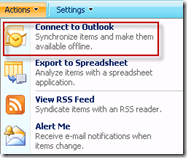
Often, this problem is resolved by installing the SharePoint Services Support for Office and/or simply repairing Office. You can also find a good guide to troubleshooting this issue here. But none of these options were resolving the issue. Additionally, as I began to investigate to see if the problem could be recreated on various tech workstations, I realized that the impact was not isolated to a single workstation, but almost all workstations in our helpdesk. Of the systems that were not affected, one of them resided on my desk, a lab PC that had since departed from the standard Windows XP Pro image we deploy firm-wide. Read the rest of this entry »
Posted in Office, Troubleshooting | Tagged: Office, Outlook, Process Monitor, Sharepoint | Leave a Comment »
Posted by William Diaz on November 7, 2011
Sometimes, the obvious is over looked because error messages often do not allude to the actual problem being encountered. For example, the online document management service eRoom presenting the following error when trying to open a file: “Unfortunately, eRoom was unable to open this file, because the directory could not be found.”

At first glance, this doesn’t means anything. But examining the settings of the application provides a clue:
Read the rest of this entry »
Posted in Inside Windows, Troubleshooting | Leave a Comment »
Posted by William Diaz on November 1, 2011
Account locks normally are not a big deal to troubleshoot. Often times it is a user typing in an incorrect password to the account they are trying to logon to too many times. Other times, it is being caused by expired or incorrect cached credentials being used to authenticate to some network resource. In the latter case, this is a simple matter of going onto the workstation that has been identified as one locking the account and removing the cached credentials.
In Windows XP, this can be done by going to Start > Settings > Control Panel > User Accounts > Advanced (or Manage Passwords for non-admins) > Advanced > Manage Passwords. Alternatively, you can just use the control userpasswords2 command.
Read the rest of this entry »
Posted in Troubleshooting | Tagged: Networking, Printing, TCPView | Leave a Comment »
Posted by William Diaz on October 14, 2011
Our Production ISAs’ have an added cloud-based layer of security to protect our network from malicious web content. Every now and then, though, we run into false-positives. Some of these are:
Intentionally Corrupts Downloads
The Case Of The Corrupt Download & The Case of the Zip File That Wouldn’t Open
Stops web pages from loading by preventing the execution of legitimate scripts: Read the rest of this entry »
Posted in Troubleshooting | Tagged: IE, Networking, Security | Leave a Comment »
Posted by William Diaz on October 14, 2011
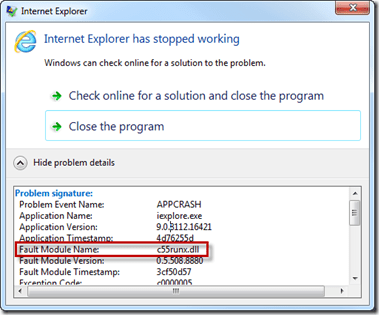
Sometimes Microsoft applications do a a good job at identifying the problem module when they crash. For example, in the Windows Vista/7 OS IE crashes with “Internet Explorer has stopped working”. Simply click the Details chevron to and look at the Fault Module Name:
Read the rest of this entry »
Posted in Troubleshooting | Tagged: Crash, Hang, IE, Word | Leave a Comment »





 Windows Explored