Archive for the ‘Inside Windows’ Category
Posted by William Diaz on December 28, 2010

If you didn’t already know, Outlook 2003 and earlier use IE as its print engine when printing html formatted messages. This means you sometimes need to go to IE to correct problems with emails printing outside of the print margins. These settings are found under File > Page Setup. The defaults are 0.75 on all sides. When coming across issues like this, I often find the margins set to 0.25.
This behavior is not the same for all html formatted messages. Some emails have web content embedded or pasted into them and will have odd page characteristics that cause the message to print outside the margins and may be difficult to correct. Different versions of IE also handle html messages differently.
In Office 2007/2010, html messages in Outlook no longer rely on IE and now use a MS Office html as the printing engine.
Posted in Inside Windows, Troubleshooting | Tagged: Internet Explorer, Outlook, Printing | Leave a Comment »
Posted by William Diaz on December 1, 2010
I know Microsoft wants to us to use the Pin this program to taskbar feature but I don’t care for it. I really like the Quick Launch feature. Out of the box, Windows Vista and 7 do not enable the Quick Launch. But you can bring it back with little effort. To do so, right click the Taskbar and select New toolbar.
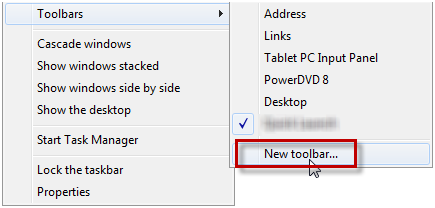
Now paste the following into the toolbar path location: %appdata%\Microsoft\Internet Explorer\Quick Launch.
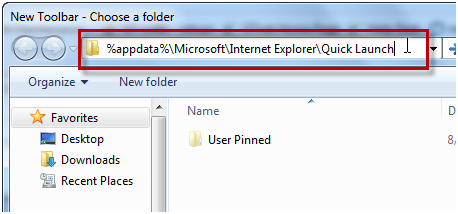
Confirm the path to the new toolbar before selecting Select Folder.

The Quick Launch toolbar was not placed into the left side of the taskbar in my case so drag it to the desired area of the taskbar if needed. If you prefer, right-click the QL and uncheck the options to the Show Text and Show Title options.

Posted in Inside Windows | Leave a Comment »
Posted by William Diaz on November 15, 2010
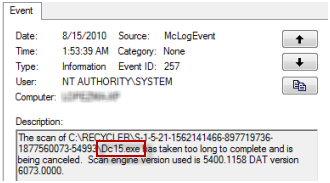
When troubleshooting an issue some time ago, I inadvertently came across a number of exe files residing on a user’s system. I stumbled across them while looking at the Windows Event Viewer and thought the name sounded suspicious:
Read the rest of this entry »
Posted in Inside Windows | Tagged: Malware | Leave a Comment »
Posted by William Diaz on October 21, 2010
A good read on the Windows shutdown process along with some troubleshooting techniques: http://blogs.msdn.com/b/ntdebugging/archive/2007/06/09/how-windows-shuts-down.aspx
Posted in Inside Windows | Leave a Comment »
Posted by William Diaz on August 19, 2010
Windows 7 includes a neat tool called Problem Step Recorder. The idea here is when the user runs into a reproducible error, they can start the Problem Step Recorder to record the actions that led to the error. After the problem has been produced, the user ends the recorder and the actions are wrapped up into a file that can be sent off to their tech support staff. I am eager to see our users submit incidents to us using this. Read more about here:
http://windows.microsoft.com/en-US/windows7/How-do-I-use-Problem-Steps-Recorder
http://blogs.technet.com/b/askperf/archive/2009/10/21/windows-7-windows-server-2008-r2-problem-steps-recorder.aspx
Video tutorial:
http://technet.microsoft.com/en-us/windows/dd320286.aspx
And on both monitors:
http://blogs.technet.com/b/drey/archive/2010/07/21/windows-7-wednesday-tip-problem-steps-recorder.aspx
Posted in Inside Windows | Tagged: Windows 7 | Leave a Comment »
Posted by William Diaz on August 11, 2010
Here’s a neat trick to put all Windows 7 control panels into one location, also known as “God” mode. Create a new folder on the desktop and change its name to GodMode.{ED7BA470-8E54-465E-825C-99712043E01C}. Actually, you can name it anything, e.g. OneStopShoping.{ED7BA470-8E54-465E-825C-99712043E01C}.
The icon will change to the Control Panel Icon and you now have one stop shopping for configuration settings in the OS:

Posted in Inside Windows | Leave a Comment »
Posted by William Diaz on August 11, 2010
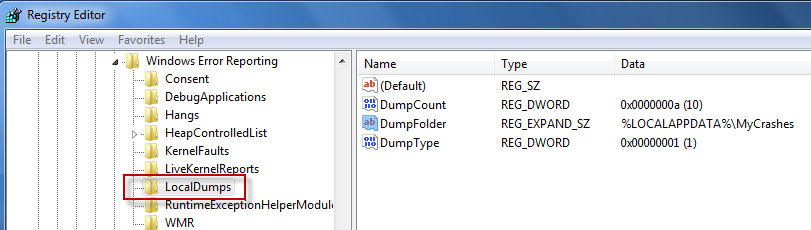
Windows Vista and 7, unlike Windows XP, do not come enabled with a post-mortem debugger out of the box . But you can enable crash dump archiving by editing the Windows registry.

The crash dump will be created in \Users\UserName\AppData\Local. To change the destination, modify DumpFolder to the desired path.
Alternatively, if the app errors and the process remains running until the error message box is dismissed, you can use the Windows Task Manager to manually dump the process by right-clicking it and choosing Create Dump File.

See this MSDN article here for more details.
Posted in Inside Windows | Tagged: Crash, Dump | 3 Comments »
Posted by William Diaz on July 8, 2010
Every now and then the need arises where a user needs to print a web page with a custom header and for filing or reference purposes. We are still pretty much running on an Internet Explorer 7 platform (sigh) so this can be somewhat cryptic as IE 7 uses codes to determine what and where header and footer information is printed. Header/Footer codes are accessed from the File > Page Setup menu in IE: Read the rest of this entry »
Posted in Inside Windows | Tagged: Internet Explorer, Printing | Leave a Comment »
Posted by William Diaz on July 8, 2010
Every now and then someone would complain about this message appearing after logon: “To free up disk space, Outlook Express can compact messages…”

The problem was that they failed to complain to the right person. Eventually, one of my co-workers encountered it and asked me to investigate. We thought it odd because we used Outlook, not Outlook Express. To quickly identify the culprit, I turned to Process Explorer from SysInternals and used the Find Window’s Process menu icon. Simply drag the crosshairs over the window in question and Process Explorer highlights the process. You can see below the process identified was WindowsSearch.exe: Read the rest of this entry »
Posted in Inside Windows, Troubleshooting | Tagged: Process Explorer | Leave a Comment »
Posted by William Diaz on July 6, 2010
Good read. I am guilty of some of these tweaks during my earlier PC enthusiasts days. I continue to actually see some of these being used in workplace environments.
http://lifehacker.com/5033518/debunking-common-windows-performance-tweaking-myths
Posted in Inside Windows | Tagged: PC Myths | Leave a Comment »




 Windows Explored