Posts Tagged ‘Internet Explorer’
Posted by William Diaz on July 12, 2011
…and you don’t necessarily need to know a thing about web scripts!
My issue started when I came in one morning and went about making some aesthetic changes to one of our SharePoint pages. First, I needed to clean up some of links in the navigation pane on the left hand of the site but all I saw was this:

I should have seen all the various navigation menu heading and links like below:
Read the rest of this entry »
Posted in Troubleshooting | Tagged: Internet Explorer | 2 Comments »
Posted by William Diaz on February 10, 2011
I find myself working remotely on various issues all the time. Often, it is quite late and there is no line of communication with the affected user (and sometimes the technician that escalated the issue). That was the case recently. I needed to obtain an unpublished secure URL to a login portal to recreate and correct a problem. This information should have been included in the incident but was not. In our IT environment, we enforce “Empty Temporary Internet Files folder when browser is closed” through group policy; additionally, earlier troubleshooting had resulted in the IE History and Cookies being deleted. As a result, I would not be able to go through any of the files stored in the temporary Internet folder to find the URL I was looking for.
Well, that’s not entirely true. Read the rest of this entry »
Posted in Uncategorized | Tagged: Internet Explorer | Leave a Comment »
Posted by William Diaz on December 30, 2010
I have run into quite a few IE environments in my time, often cluttered with annoying toolbars. Although I frown upon too many toolbars in any browser, I decided to see how many toolbars I could install in IE before I got tired. To isolate this potentially unstable environment, I started Windows XP mode from my Windows 7 system and after 45 minutes achieved the following:
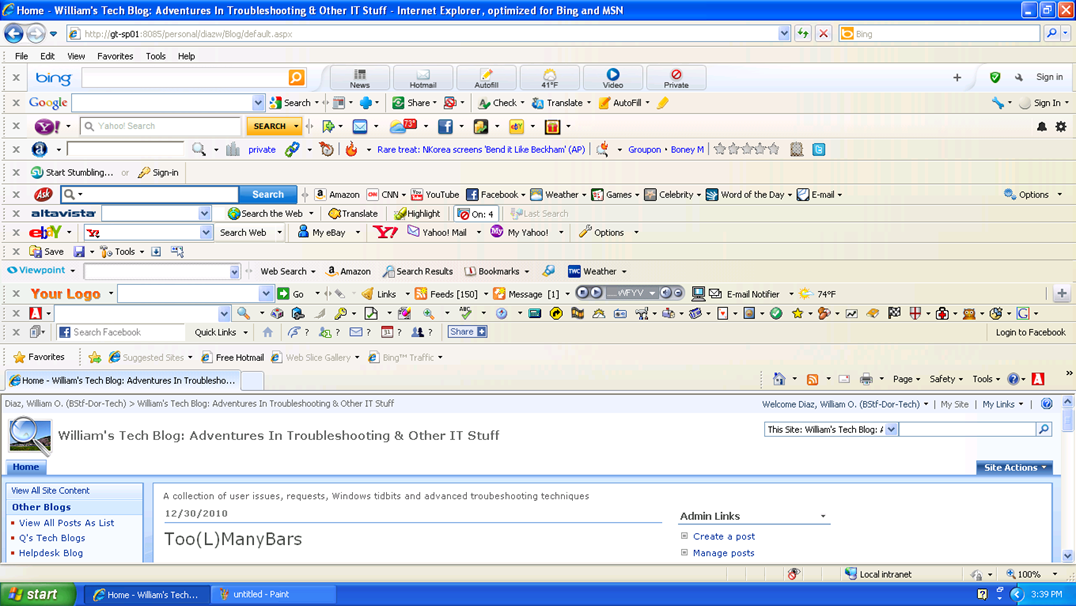
Now begins the process of removing the toolbars.
Posted in Uncategorized | Tagged: Internet Explorer | Leave a Comment »
Posted by William Diaz on December 28, 2010

If you didn’t already know, Outlook 2003 and earlier use IE as its print engine when printing html formatted messages. This means you sometimes need to go to IE to correct problems with emails printing outside of the print margins. These settings are found under File > Page Setup. The defaults are 0.75 on all sides. When coming across issues like this, I often find the margins set to 0.25.
This behavior is not the same for all html formatted messages. Some emails have web content embedded or pasted into them and will have odd page characteristics that cause the message to print outside the margins and may be difficult to correct. Different versions of IE also handle html messages differently.
In Office 2007/2010, html messages in Outlook no longer rely on IE and now use a MS Office html as the printing engine.
Posted in Inside Windows, Troubleshooting | Tagged: Internet Explorer, Outlook, Printing | Leave a Comment »
Posted by William Diaz on October 13, 2010
It doesn’t surprise me when Internet Explorer crashes. Instead, I remain calm and collected (most of the time). I don’t expect the average person to know why or how it happened and I expect them to take the opposite approach and be fed up with IE. But with everything that’s happening with the endless number of add-ons that it needs to support and the dynamic nature of web content, it’s amazing it works more often than not. So, here I was asked to explore the latest case of IE crashing. Our user has logged into an online document collaboration site. They need to open and print several dozen documents. About half the time, the client is interrupted by the following error before IE crashes: “Microsoft Visual C++ Runtime Library. Runtime Error!.. iexplore.exe. abnormal program termination”

Read the rest of this entry »
Posted in Troubleshooting | Tagged: Crash, Dump, Internet Explorer, WinDbg | Leave a Comment »
Posted by William Diaz on October 12, 2010
She called me one day. I had no idea who she was. She was in one of our local offices and someone told her I was the crack desktop support tech to speak to cause “he knows a lot.” This is true, no doubt, and I’m honored some people think this highly of me. Since then, she has called me over many an issue, and in particular turned me on to what has become a known bug between Internet Explorer, a 3rd party toolbar application we use for tracking time (LexisNexis for the benefit of search queries for this in my SharePoint blog), and shipper’s tracking website. This would happen while trying to print shipping labels via Internet Explorer. Yes or No would crash IE. The error would often present itself as the following: “Runtime error. Corrupt block/Unknown block type freed. This is probably caused by freeing a static variable or bad pointer. Do you want to GPF?”
 Read the rest of this entry »
Posted in Troubleshooting | Tagged: Crash, Dr Watson, Internet Explorer | Leave a Comment »
Posted by William Diaz on October 2, 2010
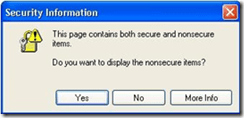
In an earlier post, I blogged about a request where the user no longer wanted to be annoyed by the IE’s security information prompt when visiting secure sites and the problem involved in trying to circumvent this setting in an environment where this is controlled via group policy. This time, I came across an issue where the user was being interrupted by the same prompt when visiting an internal resource that should not be displaying the IE “Security Information” prompt for secure sites.
Read the rest of this entry »
Posted in Troubleshooting | Tagged: Autoruns, Internet Explorer, Malware | Leave a Comment »
Posted by William Diaz on September 1, 2010
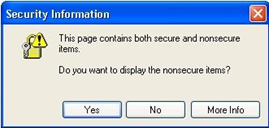
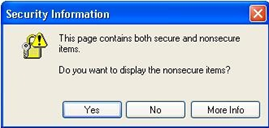
I’m always eager to learn some Internals, whether its Windows, Office or Internet Explorer. A request from one of our high-profile user provided me this chance. She wanted me to prevent the following message prompt from appearing when she visited secure sites (she did this a lot as part of her work): “This page contains both secure and nonsecure items. Do you want to display the non secure items?”
 Read the rest of this entry »
Posted in Uncategorized | Tagged: Internet Explorer, Process Monitor | Leave a Comment »
Posted by William Diaz on August 26, 2010
I was asked to assist when one of user’s was unable to perform the simple, mundane task of printing a web page in Internet Explorer. Furthermore, they could not even print preview the page. There was no error of any kind and IE simply went on with its business like nothing happened. I started my analysis by running Process Monitor on the workstation, creating a filter in the trace log for iexplore.exe. I then repeated the steps of the user by going to File > Print Preview and then stopped the trace log. There were just over 500 events logged in that one action, small enough that I was quickly able to scroll through it and I some Access Denied results: Read the rest of this entry »
Posted in Troubleshooting | Tagged: Internet Explorer, Printing, Process Monitor | Leave a Comment »
Posted by William Diaz on August 18, 2010
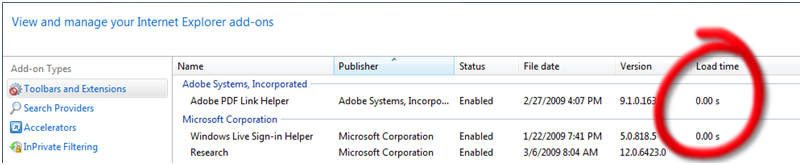
This is available only in IE 8 (and eventually IE 9). If IE is taking too long to start up, one of the things you can do to troubleshoot this is to go into Manage Add-ons from Tools > Internet Options > Programs and check the Load time column for the various toolbars and extensions:
UPDATE
Since writing this, IE9 Beta has been released and it will automatically inform you when an add-on takes too long to load. This is known as the Add-on Performance Advisor. The threshold has been set to 0.2 seconds. Anything taking longer and you will be advised by IE. Read here for further details.
Posted in Uncategorized | Tagged: Internet Explorer | Leave a Comment »



 Windows Explored