Posted by William Diaz on June 11, 2012
I had a USB flash device that just stopped working suddenly. When I plugged it in, the following message popped up in Windows: “You need to format the disk in drive before you can use it.”

That was odd because earlier it was formatted with FAT32 and seemed to be working normally (copied files to it). Luckily, I didn’t have anything important stored on it, clicked Format disk and was the presented with the format options and selected Start.
Read the rest of this entry »
Posted in Troubleshooting, Troubleshooting Tools | 57 Comments »
Posted by William Diaz on June 7, 2012
While trying to install one of the utilities within the Windows SDK, the setup was failing. Clicking the View Log option within the SDK Setup GUI pulls up the log (you can also find it at C:\%user%\AppData\Local\Temp\SDKSetupLog.txt). I scanned to the end of the log and saw these details:
MSI (s) (60:D8) [12:10:44:541]: Windows Installer removed the product. Product Name: Microsoft Windows SDK for Windows 7 (7.1). Product Version: 7.1.30514. Product Language: 1033. Manufacturer: Microsoft Corporation. Removal success or error status: 0.
12:10:39 PM Wednesday, June 06, 2012: SFX C:\Program Files\Microsoft SDKs\Windows\v7.1\Setup\SFX\vcredist_x64.exe installation started with log file C:\Users\w7test06\AppData\Local\Temp\Microsoft Windows SDK for Windows 7_f83227e1-caa8-4d71-a809-43745c870815_SFX.log
12:10:43 PM Wednesday, June 06, 2012: C:\Program Files\Microsoft SDKs\Windows\v7.1\Setup\SFX\vcredist_x64.exe installation failed with return code 5100
12:10:44 PM Wednesday, June 06, 2012: [SDKSetup:Error] Config_Products_Install: Installation of Product Microsoft Windows SDK for Windows 7 (failed): Please refer to Samples\Setup\HTML\ConfigDetails.htm document for further information. Stack: at SDKSetup.Product.ConfigureRelatedSfx() at SDKSetup.Product.ConfigureNewProduct(ManualResetEvent CancelEvent)
12:10:44 PM Wednesday, June 06, 2012: [SDKSetup:Info] Config_Products_InstallNew: End installation of new product: Microsoft Windows SDK for Windows 7
It looks like there is an issue with the version of the Microsoft Visual C++ Redistributable 2010 x64 currently installed on the system.

I removed both the x64 and x86, ran the SDK setup again and the installation was successful. Slightly earlier versions of both redistributables were installed:

SDK setup also seems to be sensitive to environmental variable TEMP if it is anything else besides %temp% as noted in an earlier blog.
Posted in Troubleshooting | Leave a Comment »
Posted by William Diaz on June 5, 2012
I was recently given a netbook to look at after it was hit by some malware. The malware exe had already been removed but it left a few common system utilities like the Task Manager and the Windows Registry Editor in a dysfunctional state. Furthermore, popular anti-malware utilities and anti-virus utilities were also not able to run. For example, trying to run taskmgr.exe or regedit produced the following error: “Windows cannot find ‘C:\Windows\system32\taskmgr.exe’…”

Read the rest of this entry »
Posted in Troubleshooting, Troubleshooting Tools | Tagged: Autoruns, Malware | 3 Comments »
Posted by William Diaz on June 4, 2012
From time to time, we have seen some standard company emails as well as non-company emails throw the following message prompt when clicking on or opening: “Language pack installation. To display language characters correctly you need to install the following language pack…”

Posted in Troubleshooting | Tagged: Outlook | 1 Comment »
Posted by William Diaz on June 1, 2012
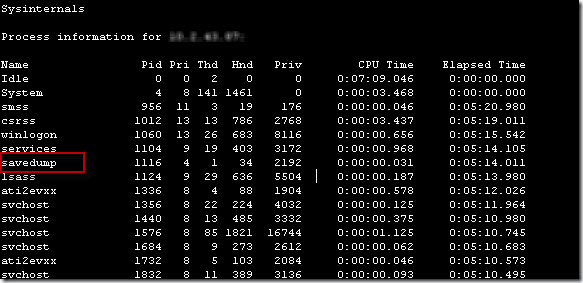
This was initially described as a log off each time the user opened Outlook. This was the first time I heard of Outlook logging someone off their system when it was opened. This sparked my curiosity, of course, so I asked the techs working on this to leave it alone until I had a chance to look after hours. I started by connecting remotely to the Windows Event Viewer for the problem workstation to see if anything obvious stood out. After about a minute, the MMC console became hung and I could no longer browse events. I thought maybe the workstation became disconnected from the network, so I waited and tried again a few minutes later. I resumed browsing the event logs … only to get disconnected again. Logging in via RDP or VNC was also a no go, as I was getting disconnected after about 2 minutes, barely enough time to get pass the initial desktop and application loading and analyze what was happening. My next approach was to query the workstation for all the running processes via PsList from SysInternals (using the Front End for PsTools); maybe something might stand out and allude to what was happening:
Read the rest of this entry »
Posted in Troubleshooting, Troubleshooting Tools | Tagged: Autoruns, Crash, Dump, Malware, WinDbg | 2 Comments »
Posted by William Diaz on June 1, 2012
This mysterious issue arrived to me as an email from another technician. His caller wanted to know why an HTML linked image was not displaying in her Outlook message, instead displaying the red X. When I received the message, I could see the image. The obvious difference was that I was using Outlook 2010 & IE 9. The user and the technician were Outlook 2003 and IE 8. The difference between the two is that Outlook 2003 uses IE to render html content, whereas Outlook 2010 uses Word. Figuring the message content was privy to Outlook 2010, I wanted to open the image link in IE9. To get the image link, view the email as raw html by right-clicking an empty portion of the message and selecting View Source. You might need to scroll a bit depending upon how much html formatting there is but you can locate the image link by looking for src= like in the example below or the image extension:

Read the rest of this entry »
Posted in Troubleshooting | Tagged: Internet Explorer | Leave a Comment »
Posted by William Diaz on May 18, 2012
A script that doesn’t throw an error but doesn’t do what you want it to do is encountering an error. Perhaps this is a moot point but I thought it was comical because one of my co-workers couldn’t figure out why his script wasn’t working and not “erroring” until he mentioned a few minutes later that he included On Error Resume Next in the script. The lesson learned is that you should comment-out this line out until you have a fully functioning script. Afterwards, this little lesson then reminded me that at some point awhile back I meant to write a blog about commenting out On Error Resume Next until you have a full functioning script but really didn’t think I had enough to warrant a blog. Well, with this little incident, now I have a decent paragraph to put into a blog post.
Posted in Uncategorized | Leave a Comment »
Posted by William Diaz on May 18, 2012
Not all issues I troubleshoot are at work. Sometimes I might be sitting at home and then this somewhat buggy application starts up. It’s a random occurrence and trying to resolve its problems can be very taxing. The main reason for this is I don’t have the source code and trying to reverse-engineer it is nearly impossible because it’s data structures are not logical. But maybe we can look at its crash dump and find out what’s happening.
Looking at the dump:
Read the rest of this entry »
Posted in Troubleshooting | Tagged: Crash, Dump, WinDbg | 2 Comments »
Posted by William Diaz on May 14, 2012
After logging onto my main home PC and opening IE, I noticed lag while repositioning the window around the screen. I opened the Task Manager, sorted by the CPU column and saw no single process reporting excessive usage:

Nor was the hard disk light blinking or solid. However, looking at the Performance tab revealed two of the CPU cores hovering around 100%:
Read the rest of this entry »
Posted in Troubleshooting, Troubleshooting Tools | Tagged: Performance | Leave a Comment »
Posted by William Diaz on May 10, 2012
A lot of vague networking issues on user workstations are sometimes troubleshot by running the netsh winsock reset catalog command, often without knowing what it does. When you run this command, you are resetting the layered service providers that come with Windows and removing all others that did not come with Windows. These “others” might be MS firewall clients, security proxies or 3rd party wireless communication apps that come with “Air Cards” used by mobile users.
In the environment that I work in, our workstations have the Microsoft Firewall Client or TMG client installed. You can directly see this as a layered service provider by opening msinfo32 and going to Components > Network > Protocol:
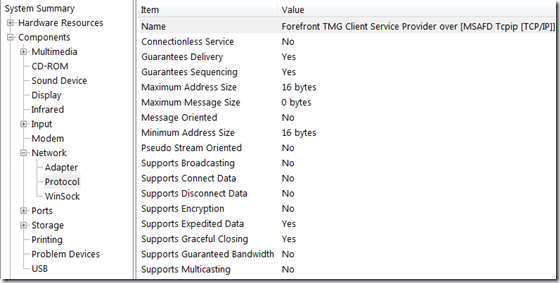
If you run netsh winsock reset you end up removing any LSPs that are not part of the Windows-Out-Of-The-Box installation. If your LSP application is self-aware, like in the case of the MS FWC or TMG client, you might notice a warning of some type:

This is a sign you need to run a repair or reinstall your LSP application (in this case, a repair of the FWC\TMG client is enough to fix and put the LSPs back in place).
The irony is that, if running netsh winsock reset resolved whatever mysterious networking issue you encountered, then you might have isolated the cause of the issue to a problem with the LSP application. I encountered this myself way back in my first blog post of the The Case of the Random Internet Explorer Crashes.
Posted in Troubleshooting | Tagged: Networking | 2 Comments »







 Windows Explored