Windows Explored

Everyday Windows Desktop Support, Advanced Troubleshooting & Other OS Tidbits

User Request – Automatically Insert Current Date Into PDF

Posted by William Diaz on August 20, 2010


What the user wants, the user gets. Especially when they tell you someone else has it or someone smarter than you did this for them a long time ago. The request here was to automatically populate several date fields in a PDF with the current date and time the PDF was opened. The idea was to expedite the filling out of the form so that it could quickly be printed out and sent out for hand delivery. 

Most PDF editing apps can accomplish with a little Java script. In the example here, I am using the PDF Converter Professional application but the steps below are similar for Adobe Acrobat or any other PDF editor. The task is to link the Java script to the various text date fields. By default, the text fields are named Text1, Text2, etc. or they can be renamed.

Once you know the field name, go to Document > JavaScript > Document JavaScripts > Add. Read the rest of this entry »

Posted in Uncategorized | Tagged: | Leave a Comment »

The Case of the Persistent Logon Prompt

Posted by William Diaz on August 19, 2010


While trying to open an application on her workstations, our user was encountering a logon prompt each time:
image
Entering her logon info failed to get pass the logon prompt. Clicking Cancel also did not dismiss the prompt and it remained stuck here. The tech handling the call was about to give up and have the application reinstalled, but I was asked to take a look for a second opinion. Read the rest of this entry »

Posted in Troubleshooting | Tagged: | Leave a Comment »

Back(space)up A Moment

Posted by William Diaz on August 19, 2010


This is rather mundane, but an issue that another technician was unable to resolve required my assistance. The problem was that at random times while the user was typing in any Office application, the Save As dialog box would suddenly open. We also established that he was not using any special keyboard, such as the ones that turn various common commands into a single button or key-stroke paradise or 3rd party kb management software. Nope, just a plain-jane standard usb kb.

Working remote and with nothing to go on, I decide to open Process Monitor.

OK, I’m kidding.

Actually, I asked the user to compose a message while I watched. He was a fast typist but I soon noticed a trend, the Save As would open when he was correcting a typo using the backspace key. The question then became how do you invoke the Save As dialog box from keyboard? F12. Backspace happens to be right under F12 on most standard keyboards. The proximity of the Backspace key to the F12 was probably causing some debris or other electrical quirkiness against the F12 key, too, making it act as if it was being depressed each time Backspace was.

The solution, in case you haven’t caught on by now, was to replace keyboard.

Not all my encounters are this exciting.

And, yes, I just had to take a picture:
image

Posted in Troubleshooting | Tagged: | Leave a Comment »

Windows 7 Problem Step Recorder

Posted by William Diaz on August 19, 2010


Windows 7 includes a neat tool called Problem Step Recorder. The idea here is when the user runs into a reproducible error, they can start the Problem Step Recorder to record the actions that led to the error. After the problem has been produced, the user ends the recorder and the actions are wrapped up into a file that can be sent off to their tech support staff. I am eager to see our users submit incidents to us using this. Read more about here:

http://windows.microsoft.com/en-US/windows7/How-do-I-use-Problem-Steps-Recorder

http://blogs.technet.com/b/askperf/archive/2009/10/21/windows-7-windows-server-2008-r2-problem-steps-recorder.aspx

Video tutorial:

http://technet.microsoft.com/en-us/windows/dd320286.aspx

And on both monitors:

http://blogs.technet.com/b/drey/archive/2010/07/21/windows-7-wednesday-tip-problem-steps-recorder.aspx

Posted in Inside Windows | Tagged: | Leave a Comment »

Troubleshooting IE Load Times from Manage Add-ons

Posted by William Diaz on August 18, 2010


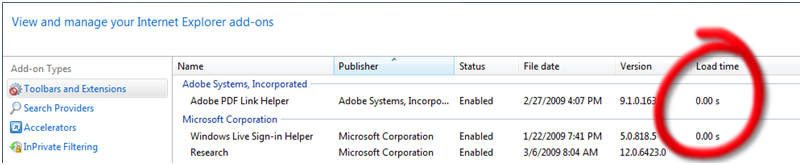
This is available only in IE 8 (and eventually IE 9). If IE is taking too long to start up, one of the things you can do to troubleshoot this is to go into Manage Add-ons from Tools > Internet Options > Programs and check the Load time column for the various toolbars and extensions:


UPDATE

Since writing this, IE9 Beta has been released and it will automatically inform you when an add-on takes too long to load. This is known as the Add-on Performance Advisor. The threshold has been set to 0.2 seconds. Anything taking longer and you will be advised by IE. Read here for further details.

Posted in Uncategorized | Tagged: | Leave a Comment »

Stop Sending Your Web Browsing Analytics to Google

Posted by William Diaz on August 17, 2010


Google offers a browser add-on that prevents them from collecting data on the web sites you visit. However, you can do this in IE natively, without the need of Google’s add-on.

  1. In Internet Explorer, open the Tools menu and click Internet Options.
  2. Click the Security tab and then click the Restricted Sites icon.
  3. Click the Sites button.
  4. In the box at the top, add *.google-analytics.com and push the Add button.
  5. Click the Close button, and then the OK button to dismiss Internet Options.

See the TechNet IEBlog here for details.

Posted in Uncategorized | Tagged: | Leave a Comment »

The Case of the Missing Windows CD\DVD Drive

Posted by William Diaz on August 17, 2010


In a large organization, this can actually be quite common. Many a floor support tech has been dispatched to try to correct by physically checking or replacing the drive. The symptom is that the CD\DVD drive letter is missing in Windows. In the vast majority of cases, this is a software issue and can be resolved remotely, without the need for someone to open the system. The cause is the result of class filters becoming corrupted or modified in some way, usually because of a badly written or incompatible driver, firmware update, or after installing CD\DVD burning software.

To correct the issue, navigate to this location in the Windows registry: HKLM\SYSTEM\CurrentControlSet\Control\Class\{4D36E965-E325-11CE-BFC1-08002BE10318}. Delete the upperfilter and lowerfilters strings and reboot. Read the rest of this entry »

Posted in Troubleshooting | Tagged: , | Leave a Comment »

Using Notepad to Troubleshoot Files that Won’t Open

Posted by William Diaz on August 13, 2010


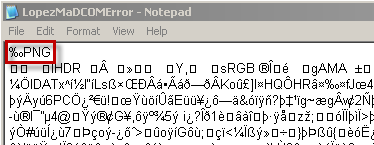
A common occurrence in technical support are user’s that receive files that are missing file extensions. Often times, you can open the file in Notepad (or any other text reader) and scan the top of data for printable strings, i.e. readable text, that allude to the application or file type it is. For example, an image file, portable network graphics:
Read the rest of this entry »

Posted in Uncategorized | Tagged: | Leave a Comment »

Blogging with Word

Posted by William Diaz on August 12, 2010


Did you know you can write and post to your blog from Word 2007 or 2010? Most popular blog sites are supported, including SharePoint, which is a big help for me since I blog a lot at work and IE SharePoint creation space is so cramp and limited.

For SharePoint blogging, write and post using Word by going into the SharePoint blog and from the Admin Links in the right side of the blog page select the Launch blog program to post: Read the rest of this entry »

Posted in Uncategorized | Tagged: , | 1 Comment »

Windows 7 "One Stop Shopping" Control Panel

Posted by William Diaz on August 11, 2010


Here’s a neat trick to put all Windows 7 control panels into one location, also known as “God” mode. Create a new folder on the desktop and change its name to GodMode.{ED7BA470-8E54-465E-825C-99712043E01C}. Actually, you can name it anything, e.g. OneStopShoping.{ED7BA470-8E54-465E-825C-99712043E01C}.
The icon will change to the Control Panel Icon and you now have one stop shopping for configuration settings in the OS:

image

Posted in Inside Windows | Leave a Comment »