

While trying to extract the SysInternal PSTools.zip, I was running into the following error: “The Compressed (zipped) Folder is invalid or corrupted.”

Read the rest of this entry »
The Case of the Zip File That Wouldn’t Open
Posted by William Diaz on December 8, 2010
Posted in Troubleshooting | Tagged: Networking, Process Monitor | 2 Comments »
CRC & Bad Blocks
Posted by William Diaz on December 3, 2010
Its actually refreshing when I come across a problem that does not always manifest itself as GUI error in Windows, or even a software problem for that matter. If, when trying to boot into Window, it fails to load in a timely manner or not load at all, try starting in SafeMode (F8). You should being able to see which system files are being loaded and, in cases where the file system and hard disk where it resides are having problems. you may get lucky (well, lucky in the sense that you can decipher what may be happening). For example, in the case of a laptop I was asked to diagnose it would hang at : “Loaded: \Windows\System32\drivers\crcdisk.sys”
Read the rest of this entry »
Posted in Uncategorized | Tagged: Hardware | 2 Comments »
Process (Monitor) of Elimination
Posted by William Diaz on December 2, 2010
The problem presented itself as thus: “Microsoft Visual Basic … Run-time error ‘-2147024894 (800700002)’: Automation Error . The system cannot find the file specified.”

Read the rest of this entry »
Posted in Office, Troubleshooting | Tagged: Process Monitor, Word | 2 Comments »
Restoring the Quick Launch in Vista & Win7
Posted by William Diaz on December 1, 2010
I know Microsoft wants to us to use the Pin this program to taskbar feature but I don’t care for it. I really like the Quick Launch feature. Out of the box, Windows Vista and 7 do not enable the Quick Launch. But you can bring it back with little effort. To do so, right click the Taskbar and select New toolbar. 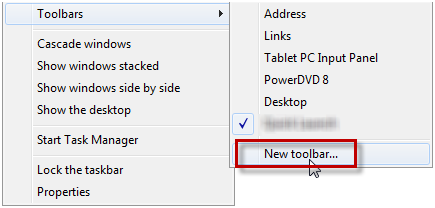
Now paste the following into the toolbar path location: %appdata%\Microsoft\Internet Explorer\Quick Launch. 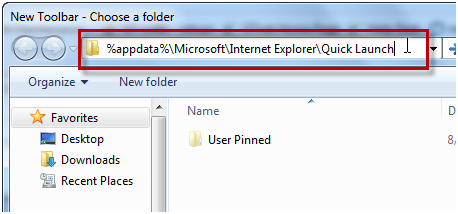
Confirm the path to the new toolbar before selecting Select Folder. 
The Quick Launch toolbar was not placed into the left side of the taskbar in my case so drag it to the desired area of the taskbar if needed. If you prefer, right-click the QL and uncheck the options to the Show Text and Show Title options. 
Posted in Inside Windows | Leave a Comment »
Deleting the Word "Data" Key–What Does It Mean, Anyway?
Posted by William Diaz on November 19, 2010
The term corruption gets thrown around way too-often without actually knowing what it means or how it happens. If you troubleshoot Word often, all of us at one time or another have had to delete the Word Data key from the Windows Registry in an attempt to correct some problem. But what are you actually doing when you delete this key? To get an idea, visit the Word MVP site and read this: http://word.mvps.org/faqs/customization/DataKeySettings.htm
You should also familiarize yourself with the following Microsoft KB Article that covers the Word data key and a few other keys: http://support.microsoft.com/kb/921541
If you bother to look at the registry values you will see they are unreadable,but if you open the Settings REG_BINARY and scroll down you will see readable text, which contains, among other things, data to Word .dot files.
When we say that the Word data key is or may be "corrupt" this could mean that information here is referencing non-existent/moved data or problem add-ins, like templates. In fact, to demonstrate what a corrupted Word data key can do, I opened both REG_BINARY types and edited the data by typing gibberish into them. When done, I opened Word and produced the following:

Posted in Troubleshooting | Tagged: Crash, Word | Leave a Comment »
Just When You Thought You Had A Virus
Posted by William Diaz on November 15, 2010
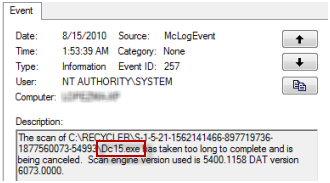
When troubleshooting an issue some time ago, I inadvertently came across a number of exe files residing on a user’s system. I stumbled across them while looking at the Windows Event Viewer and thought the name sounded suspicious:
Read the rest of this entry »
Posted in Inside Windows | Tagged: Malware | Leave a Comment »
54 68 65 20 43 61 73 65 20 6f 66 20 74 68 65 20 4d 79 73 74 65 72 69 6f 75 73 20 53 79 73 74 65 6d 20 44 65 6c 61 79 73
Posted by William Diaz on November 14, 2010
The complaint: Excel would hang while opening. When it finally did come to life, it would keep getting hung doing almost any task. Often, these issues are troubleshot in a predictable manner: Repair Office, Uninstall Office, Reinstall Office, and, finally, take a shotgun to the user’s Windows profile and blow it away. Personally, I frown on these approaches; they only serve to make the user start from scratch while doing nothing in revealing the problem. Another downside to this approach is you may be dealing with something impacting several users/workstations, each being handled independently of an identical issue by the tech in the next cubicle. And, being that the problem was related to the user profile, specifically in HKCU, it is likely each one would have resulted in a Windows Profile recreation. If you have had to recreate a profile, these can be timely since not all setting’s in today’s large enterprise environments are copied into the roaming profile (think folder exemptions, for example). Read the rest of this entry »
Posted in Troubleshooting | Tagged: Autoruns, Hang, Process Explorer, WinDbg | Leave a Comment »
The Case of the Failed Registry Edit
Posted by William Diaz on October 29, 2010
I like to play with post mortem debuggers to help troubleshoot issues with crashing or hanging application by doing some basic analysis of the dump files. Often times I change the Windows debugger between Dr Watson and WinDbg on my Windows Xp workstations. To make Windbg the default debugger you can go into the command shell and run the following command: Windbg –I. After doing this many times previously, I was surprised when I encountered the following error when trying to change the debugger on my Windows 7 workstation. “WinDbg was not successfully installed as the default postmortem debugger. This operaton requires administrative privileges.”
Read the rest of this entry »
Posted in Troubleshooting | Tagged: Anti-Virus, Process Monitor | 2 Comments »
Inside Windows – How Windows Shuts Down
Posted by William Diaz on October 21, 2010
A good read on the Windows shutdown process along with some troubleshooting techniques: http://blogs.msdn.com/b/ntdebugging/archive/2007/06/09/how-windows-shuts-down.aspx
Posted in Inside Windows | Leave a Comment »
Recovering Windows Profiles Using the Registry
Posted by William Diaz on October 19, 2010
Sometimes a user has logged onto Windows and soon notice that the desktop is missing their personal icons, display settings, and other tidbits, resulting in a call to the help desk. Often times, the user will be presented with an error after logon but before the desktop loads indicating that roaming profile could not be loaded either because it could not be found, was corrupted, or due to insufficient security rights: “User Enviornment. Windows cannot load the locally stored profile…”

Read the rest of this entry »
Posted in Troubleshooting | 1 Comment »
 Windows Explored