Posted by William Diaz on February 3, 2011
All of you have at one point or another had to troubleshoot an issue with Office that required you to repair or reinstall Office. Have you ever wondered why these two options exist and what they do differently from the other? The answer is in a single parameter attached to the command and this parameter can sometimes make all the difference.
Microsoft KB article 298027 states:
There is a subtle difference between these two options and you will want to make sure you choose the appropriate option based on your situation. In either case, the Windows Installer /f command line switch is being called. The difference is in the parameters that are being attached to the /f switch.
Note You can also perform a Repair procedure from any of the Office programs by clicking Detect and Repair on the Help menu. This procedure is the same procedure that is performed when you click the Detect and repair errors in my Office installation command in Maintenance mode. Read the rest of this entry »
Posted in Inside Windows, Troubleshooting | Tagged: Office | Leave a Comment »
Posted by William Diaz on February 3, 2011
Process Explorer can often times give you clues to hung processes. Simply open the hung process and go to the Threads tab. Take this case here where Outlook was hanging and showing significant CPU usage while trying to send an email. I started by identifying the hung thread. In this case, CPU time and CSwitch Delta columns make this obvious. Select the thread and double-click it or click the Stack button to see the state of the stack. The stack reads from bottom to top. Look at the most recent frames for clues to the problem. In this case, mshtml.dll stands out:
Read the rest of this entry »
Posted in Troubleshooting | Tagged: Hang, Outlook, Process Explorer | 2 Comments »
Posted by William Diaz on January 27, 2011
I was asked to troubleshoot a user’s connectivity issues with AIM. I am not too enthusiastic about anything AOL related but I would look anyway. One of the things I wanted to do was see if AIM had some internal network logging built into it. Starting with version 7.5.8.2 there is an option that resides under Settings > Connection that enables diagnostic network logging. Read the rest of this entry »
Posted in Uncategorized | Tagged: Networking, Security | Leave a Comment »
Posted by William Diaz on January 14, 2011
It is not usually the case that a “faulting” module is the actual cause of an application error, crash, or hang. Take this example where Outlook was crashing each time after the user opened Outlook: Read the rest of this entry »
Posted in Troubleshooting | Tagged: Crash, Outlook | Leave a Comment »
Posted by William Diaz on December 30, 2010
I have run into quite a few IE environments in my time, often cluttered with annoying toolbars. Although I frown upon too many toolbars in any browser, I decided to see how many toolbars I could install in IE before I got tired. To isolate this potentially unstable environment, I started Windows XP mode from my Windows 7 system and after 45 minutes achieved the following:
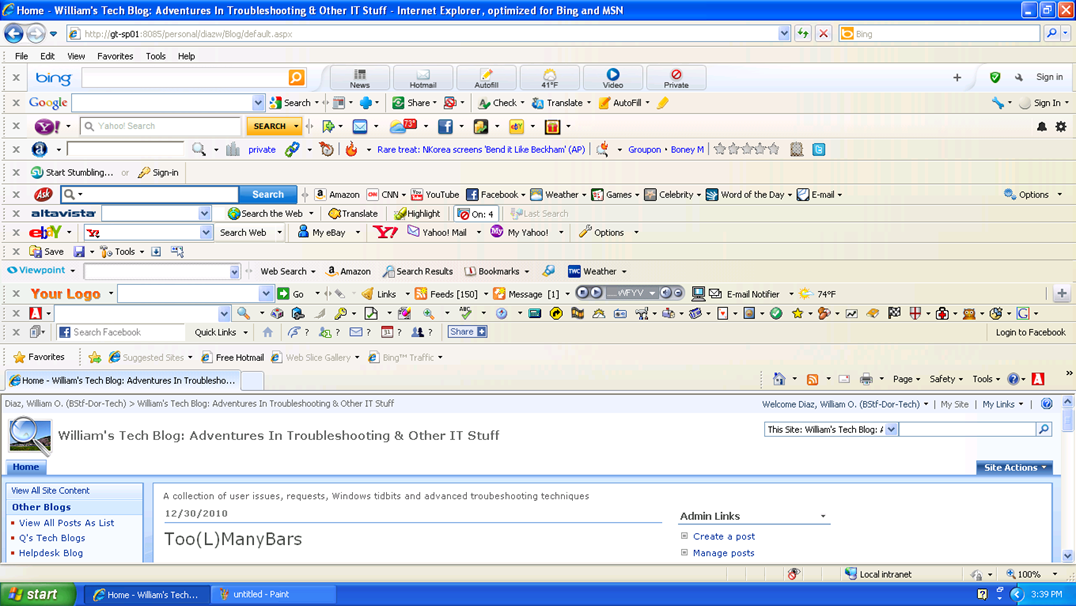
Now begins the process of removing the toolbars.
Posted in Uncategorized | Tagged: Internet Explorer | Leave a Comment »
Posted by William Diaz on December 28, 2010
It’s a mystery how some files get their file extensions changed or removed. I have no doubt that some users think that manually changing it makes it compatible with whatever program they want it to open in. We often get files that contain a .doc extension but fail to open in Word. Sometimes they are corrupted, sometimes they are in a newer version of Word, and sometimes they are not Word documents at all. When you run into these, the easiest way to determine what kind of file it is is to open it with Notepad (or any text reader for that matter) and look for readable text in the data. Here is an example:
Read the rest of this entry »
Posted in Office, Troubleshooting | Tagged: Word | Leave a Comment »
Posted by William Diaz on December 28, 2010

If you didn’t already know, Outlook 2003 and earlier use IE as its print engine when printing html formatted messages. This means you sometimes need to go to IE to correct problems with emails printing outside of the print margins. These settings are found under File > Page Setup. The defaults are 0.75 on all sides. When coming across issues like this, I often find the margins set to 0.25.
This behavior is not the same for all html formatted messages. Some emails have web content embedded or pasted into them and will have odd page characteristics that cause the message to print outside the margins and may be difficult to correct. Different versions of IE also handle html messages differently.
In Office 2007/2010, html messages in Outlook no longer rely on IE and now use a MS Office html as the printing engine.
Posted in Inside Windows, Troubleshooting | Tagged: Internet Explorer, Outlook, Printing | Leave a Comment »
Posted by William Diaz on December 22, 2010
One of my saucy co-workers asked why were we using the various debugging tools (WinDbg, Adplus, Debug Diagnostics) to resolve issues with crashing apps. This turned into a debate, mostly over semantics, because were not actually resolving issues using these tools, at least not directly. It should be pointed out that just because you use debugging tools does not imply that you are debugging. The process of debugging means to remove the bugs from program code. That’s not what I (or we) are using the debugging tools for. For that, we would need access to the source code; and even if we had access to it we are not professional programmers and lack the experience to correct buggy code.
The main purpose of using these tools in our capacity is to diagnose an application hang or crash when the normal troubleshooting techniques fail. The goal is to identify the component or module causing the hang or crash and then work around it by either upgrading (or downgrading), disabling, or removing the app, and hopefully it is not a mission critical app. If it is a mission critical app, then further escalation needs to take place that involves the developer and you can provide your crash/hang dumps to them for analysis.
In the end, what you have done is used these tools for Basic Crash or Hang Analysis. This is where your job is complete and someone else’s begins.
Posted in Uncategorized | Leave a Comment »
Posted by William Diaz on December 16, 2010
Every now and then you might encounter a message that contains ATTXXXXX.htm attachment(s):

If you try to open these, by default they will launch in IE but not open anything or may not display anything meaningful. The reason for this is that the attachment is just a fragment of formatting code from the message body, i.e. html tags. You can see this by right-clicking in the page and selecting View Source:
Read the rest of this entry »
Posted in Troubleshooting | Tagged: Outlook | 3 Comments »
Posted by William Diaz on December 13, 2010
The Office 2007/2010 native file format is now xml based. What does this mean to you troubleshooters? Earlier versions of Office files, for example Word, saved all the formatting, text, images, etc as a single binary file. With the latest Office offering, all those document “elements” are now created as xml files and then compressed into a single file. To see this, take any docx, pptx, xlsx file and change the extension to zip. When you open with Windows compressed files or WinZip, you will see different folders that contain several xml files, which contain the formatted text, pictures or other media. Here is an example of one of my blog Word 2010 articles dissected:
Read the rest of this entry »
Posted in Troubleshooting | Tagged: Office | Leave a Comment »




 Windows Explored