

Sometimes you want to make sense of memory usage to gauge its impact on system performance or to just get a better understanding how memory is being allocated. For that, we can turn to the Performance tab in the Windows Task Manager. Here is a quick rundown of the memory metrics the Windows XP Task Manager. Read the rest of this entry »
Making Sense of Memory Metrics in the Windows XP Task Manager
Posted by William Diaz on July 1, 2011
Posted in Inside Windows | Tagged: Performance | 1 Comment »
Troubleshooting and Resolving a Hang in 90 Seconds
Posted by William Diaz on June 3, 2011
I’m a stickler when it comes to performance issues on my workstation. So it bothered me when I noticed a small delay when right clicking on my desktop. By small, I mean literally 2 seconds. I opened SysInternals Process Explorer to quickly see if the CPU was spiking:

I looked at the all the processes to see which process was the offender but the 45-60% CPU time was the total of several processes. After the menu opened and a few seconds later the CPU% would drop down to a normal 0-1%.
30 Seconds… Read the rest of this entry »
Posted in Troubleshooting | Tagged: Hang, Process Monitor, WinDbg | Leave a Comment »
Manual Discovery and Removal of Malware – Internet Security 2011-2012
Posted by William Diaz on May 19, 2011
Sometimes you have no choice but to approach malware infestations manually, even when running an AV program. Generally speaking, AV relies on malware definitions to detect threats and, if your definitions are not up-to-date, you can get hit by a Trojan, virus, or worm. Even with up-to-date definitions, you are still open to attack by the latest threats for which signatures do not yet exist. When this happens, you need to manually discover the threat and remove it. Such was the case in an earlier blog.
In the example here, one of our users was infected during a “drive by” while browsing the Internet. Our enterprise anti-virus failed to detect the threat and manual AV scans of the system failed to remove it since there was no definition for it yet. This is one of several variants of fake anti-virus (Scareware) from the Braviax suite, XP Internet Security 2011, which presents various security window pop-ups and a fake scan:
Read the rest of this entry »
Posted in Troubleshooting | Tagged: Malware, Process Monitor | 2 Comments »
Associating a Crashing Print Driver to a Printer
Posted by William Diaz on May 12, 2011
In Windows XP, if you have Dr Watson set as your post-mortem default debugger (by default it is) it usually does a good job at catching exceptions when the Windows print spooler, spoolersv.exe, crashes*. Most print spooler crashes are the result of a print driver. Finding the problem print driver is a simple matter of going into the drwtsn32.log and finding the thread that contains the FAULT, literally:
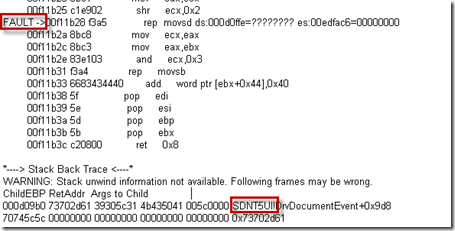
A user.dmp is also created in the DrWatson folder. This dump file offers more details and confirms it is a print driver but requires the Windows Debugging Tools to analyze. Resort to the user.dmp if the log is not revealing enough: Read the rest of this entry »
Posted in Troubleshooting | Tagged: Crash, Dr Watson, Printing | Leave a Comment »
Everything You Wanted (or Didn’t Want) to Know About the Outlook Auto-Complete File
Posted by William Diaz on May 6, 2011
Some Auto-Complete (.nk2 & .dat) facts: Read the rest of this entry »
Posted in Office | Tagged: Outlook | 3 Comments »
The Case of the Failed Blog Post
Posted by William Diaz on May 4, 2011
Every now and then I use Word 2010 to blog. I recently ran into an issue where I could no longer post to my SharePoint blog at work from my workstation and the error was rather generic, not alluding to anything: “Word cannot publish this post. The provider where you are trying to publish is unavailable…”

This was odd because previously blogs posted normally. Additionally, I was able to post to my Word Press blog on the Internet and a different internal blog. To see what was happening, I turned to Process Monitor and set a filter for winword.exe. There was nothing unusual with the file and registry activity. However, network activity stood out:
Read the rest of this entry »
Posted in Troubleshooting | Tagged: Blogging, Networking, Process Monitor, Word | Leave a Comment »
Know the Stack (or More Hang Analysis Using Process Explorer)
Posted by William Diaz on April 28, 2011
A few moments after opening Outlook, the user complains of unresponsiveness. We start by running Process Explorer. Process Explorer is “self-contained”, so there is no installation required. You can run it directly from SysInternals Live: http://live.sysinternals.com/. I also have it on our lab so I ran it from there:
Read the rest of this entry »
Posted in Troubleshooting | Tagged: Hang, Outlook, Process Explorer | 1 Comment »
Don’t Dismiss That Error
Posted by William Diaz on April 28, 2011
Instead, click the click here:
 Read the rest of this entry »
Posted in Office, Troubleshooting | Tagged: Crash, Dump, Office | Leave a Comment »
Out With the Old, In(stall) With the New
Posted by William Diaz on April 12, 2011
It’s not uncommon for outdated drivers to have a negative impact on user applications. Without knowing how to do some basic crash analysis, finding an outdated problem driver can be quite daunting when you consider how many drivers there are on the average system. However, you can simplify this by looking for or obtaining a crash dump of the application.
In the case here, we have a user complaining of frequent crashes while working in Adobe Photoshop. This is an XP system so I am hoping that Dr Watson, the default post mortem debugger*, is capturing the crash. I ask for the computer name and UNC to the location where the drwtsn32.log and user.dmp files are written when an exception is caught; this can be found in \Documents and Settings\All Users\Application Data\Microsoft\Dr Watson. Both files are there and have a recent modify date-time, and I copy both of these to my system for analysis.
Because Photoshop is primarily graphics, I am guessing we might find a graphics driver somewhere in either file along with an exception. I start by opening the drwtsn32.log, a plain text file that records a history of all the crashes it captured. The file is read from the bottom since this is where the latest information is added. From there, I do a text search going up for the word application to verify that Photoshop is the crashing application:
Read the rest of this entry »
Posted in Troubleshooting | Tagged: Crash, Dump, WinDbg | Leave a Comment »
Size Matters
Posted by William Diaz on April 8, 2011
Open exiting some client management software program each time, our user ran into the following error: “The instruction at … references memory at …. The memory could not be ‘read’…” 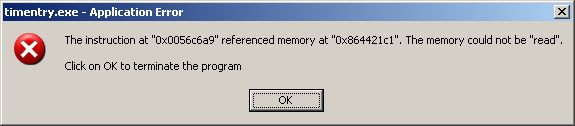
This is a network based application that relies on .Net 1.1 so previous troubleshooting involved removing and reinstalling the .Net dependencies, all to no avail. An important detail was overlooked, though, which would have saved us time and get the issue properly escalated: our user was a timekeeper for another user, who also was running into the same error on their workstation when exiting the application. From this minor detail, we could assume the issue was not workstation or user specific.
Beyond this, I have no insight behind the internal workings of this application. But, that did not mean we cannot turn to the power of the dump to get an idea of what was happening. When you encounter such an error dialog, do not click OK, do not pass go, do not collect $200. Instead dump the crashing process.
After creating a .dmp file, I copied it to my workstation and opened with WinDbg from the Windows Debugging Tools. In the only thread was an important clue in the top frame of the stack (you read threads and stacks going up, so this would be the last routine before crashing): 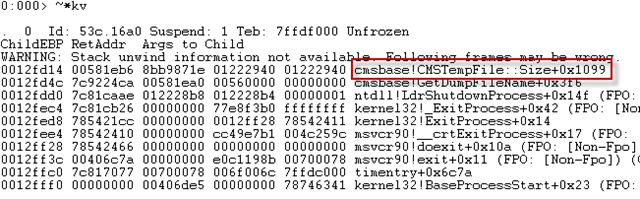
cmsbase is the module and the “!” tells us where the function starts, in this case CMSTempFile Size. Then user heard me muttering to myself this and noted that the attorney’s Subscription List was rather large. Upon escalation to the software developer, this issue was confirmed as a bug with large subscription lists. To correct, the subscription list needed to be shortened (or recreated in cases where it persisted).
Posted in Troubleshooting | Tagged: Dump, WinDbg | Leave a Comment »
 Windows Explored