Archive for the ‘Troubleshooting’ Category
Posted by William Diaz on October 5, 2011
Sometimes a BSOD is not a sign of a software issue but instead points to a hardware problem and might help explain the symptoms of bad system performance. That was the case recently when a user complained that she was having troubles trying to logon. The workstation was amazingly slow (can slow be amazing?) and then blue-screened on her randomly. My co-worker was handling this but he happens to sit right next to me and I jumped in when I heard the words “blue screen”. I unkindly interjected with “Lets get a minidump.” While he chatted her up, I went about getting her IP, connected via the UNC, went into C:\Windows\Minidump and grabbed the last two mini dumps for that day.
Minidumps excite me. To understand why, you need to have come across a great amount of support calls that usually end up trumping first tier technical support. Often times, these issues are too vague to narrow down if you don’t know how to handle a BSOD, and the incident remains open longer than it needs because it can’t be explained or reproduced immediately. The mini dump provides a means to sometimes quickly resolve what might otherwise become an unexplained system problem.
Minidumps are small, too. Between 64 and 256KB, they only record the smallest set of useful information that could help identify why the system stopped unexpectedly so there would be no problem copying from over a WAN. Once copied over to my workstation, I opened with WinDbg, clicked the !analyze -v hyper command. Both dumps produced identical results: Read the rest of this entry »
Posted in Troubleshooting | Tagged: BSOD, Crash, Dump, Hardware, WinDbg | Leave a Comment »
Posted by William Diaz on October 3, 2011
A few years ago I started to see several complaints of Internet Explorer crashing in the course of a couple months. The error was one of the rather vague exception messages thrown at the time of the crash and didn’t allude to anything obvious. Tired of not being able to explain through any of the conventional troubleshooting methods, I did a little research into advanced troubleshooting techniques and came across the Windows XP default debugger, Dr. Watson. Sure it sounds a little cheesy but this is actually a helpful little gem that has assisted me in resolving many cases of unexplained application crashes. And even though Microsoft has done away with drwtsn32.exe in all Windows operating systems after XP, the majority of small and large enterprises are still using XP, which means it should be one of core tools of any Windows XP troubleshooting guru. You’ll also see how, despite Microsoft moving to WER, Dr. Watson can still be leveraged by the Windows Vista/7 OS (just for the hell of it).
To use Dr. Watson, you don’t need to do anything. By default, it is the default Windows XP debugger. When an application experiences a exception of sorts that leads to a crash, ideally it is designed to dump that process and create two files, a plain text drwtsn32.log and a dump file named user.dmp, the latter which requires WinDbg to open and analyze. If you are not sure if Dr. Watson is the default debugger, you can run drwtsn32.exe –i to make it the default. You can also confirm by going to HKLM\Software\Microsoft\Windows NT\CurrentVersion\AeDebug and looking in the Debugger string for drwtsn32 -p %ld -e %ld –g:
Read the rest of this entry »
Posted in Troubleshooting, Troubleshooting Tools, Uncategorized | Tagged: Debugging, Dr Watson, Dump | Leave a Comment »
Posted by William Diaz on October 1, 2011
I don’t trust uninstallers. They always tend to leave something behind. Every now and then one of these orphaned components still ends up not playing well with some other application or the OS, resulting in crashing user-mode apps or the kernel. A good example of this was a previous post where I was experiencing a BSOD when running Process Monitor (read about it here) after installing a Microsoft application.
So, we have a workstation that is about to be sent off to be re-imaged because iLinc, a web conferencing application, is crashing when the user tries to join a session. I intervene because I hate to see these issue written off as unexplained. Who knows, the system gets re-imaged, the user installs some application again and the problem repeats itself (which it would have been the case here).
It happened that Dr. Watson, the Windows XP post-mortem default debugger, was capturing the user-mode crash so I jumped in without hesitation:
Read the rest of this entry »
Posted in Troubleshooting | Tagged: Autoruns, Dr Watson, Dump, Process Monitor, WinDbg | Leave a Comment »
Posted by William Diaz on September 21, 2011
Many errors or warnings you encounter in the Windows event viewer may not really have an impact on the operating system, such as causing performance bottlenecks or application errors. But that doesn’t mean it doesn’t bother me when I encounter rather vague, mundane, or unexplained errors, such as the Userenv event ID 1041 errors encountered here while recently reviewing some newly deployed workstation images at our helpdesk: “Windows cannot query DllName registry entry for {insert guid here} and it will not be loaded. This is most likely caused by a faulty registration.”
Read the rest of this entry »
Posted in Troubleshooting, Troubleshooting Tools | Leave a Comment »
Posted by William Diaz on September 9, 2011
We recently began the deployment of an add-in for Active Directory for the IT department (Defender Console). A considerable number of workstations, however, were failing to run the installer, encountering the following error: “The following dependencies are required before some application can be installed: Microsoft Visual C++ 2008 SP1 Redistributable Package.”

Read the rest of this entry »
Posted in Troubleshooting | Tagged: Process Monitor | Leave a Comment »
Posted by William Diaz on September 7, 2011
Boot performance in Windows Vista and 7 has become such a focus that a whole area of the Event Viewer is dedicated to it. Here, you can investigate boot metrics and troubleshoot causes of slow boot up times. You can find these events under Diagnostics-Performance by going to Event Viewer > Applications and Service Logs (this part of the tree will take a few seconds to expand) > Microsoft > Windows. Read the rest of this entry »
Posted in Inside Windows, Troubleshooting, Troubleshooting Tools | Tagged: Performance | 2 Comments »
Posted by William Diaz on September 1, 2011
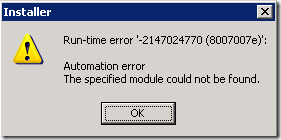
To make it easier to fix, reinstall, and install the most common applications we support in our environment, we have a front end tool that is launched from the run menu to facilitate this without the need to go digging around on the file server for batch files or scripts. While trying to reinstall an application, one of our helpdesk technicians was running into the following error while trying to run the tool on a user’s workstation: “Installer. Run-time error ‘-2147024770 (8007007e)’: Automation error – The specified module could not be found.”
Read the rest of this entry »
Posted in Troubleshooting | Tagged: Process Monitor | Leave a Comment »
Posted by William Diaz on September 1, 2011
Opening multiple instances of the registry
I often find myself needing to compare registry data between different workstations using the remote registry but you cannot simply run regedit.exe more than once to open multiple regedit windows. To work around this, run regedit –m or /m to your heart’s content to open multiple registry edit windows.
Connect to the registry of another computer or an online user
You probably already know this one. In case you don’t, File > Connect Network Registry. You won’t see the same hive you do on the local computer and there is no HKCU. Not to worry, HKCU is a subkey of HKEY_USERS. It contains the active profile on the remote computer. The profile name is based on its security identifier, or SID, e.g. S-1-5-21-156…
Read the rest of this entry »
Posted in Inside Windows, Troubleshooting | Leave a Comment »
Posted by William Diaz on August 23, 2011
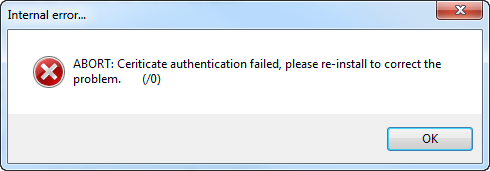
The following error was being reported while internal users were trying to install the latest Flash Player from Adobe: “Internal error… ABORT: Certificate authentication failed, please re-install to correct the problem. (/0)”

Read the rest of this entry »
Posted in Troubleshooting | Tagged: Networking, Process Monitor | 5 Comments »
Posted by William Diaz on August 3, 2011
Before any basic crash analysis, I always turn to the Windows Event view to find signs of problem. In the case here, the problem manifested itself as Outlook crashing when the user opened a particular Outlook form. Looking at the Windows Event Viewer, we see an application event for Outlook:
Read the rest of this entry »
Posted in Office, Troubleshooting | Tagged: Crash, Outlook, WinDbg | Leave a Comment »


 Windows Explored