

In Windows XP, if you have Dr Watson set as your post-mortem default debugger (by default it is) it usually does a good job at catching exceptions when the Windows print spooler, spoolersv.exe, crashes*. Most print spooler crashes are the result of a print driver. Finding the problem print driver is a simple matter of going into the drwtsn32.log and finding the thread that contains the FAULT, literally:
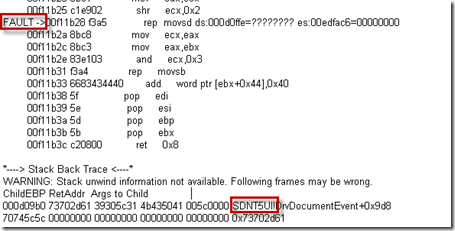
A user.dmp is also created in the DrWatson folder. This dump file offers more details and confirms it is a print driver but requires the Windows Debugging Tools to analyze. Resort to the user.dmp if the log is not revealing enough: Read the rest of this entry »
Archive for the ‘Troubleshooting’ Category
Associating a Crashing Print Driver to a Printer
Posted by William Diaz on May 12, 2011
Posted in Troubleshooting | Tagged: Crash, Dr Watson, Printing | Leave a Comment »
The Case of the Failed Blog Post
Posted by William Diaz on May 4, 2011
Every now and then I use Word 2010 to blog. I recently ran into an issue where I could no longer post to my SharePoint blog at work from my workstation and the error was rather generic, not alluding to anything: “Word cannot publish this post. The provider where you are trying to publish is unavailable…”

This was odd because previously blogs posted normally. Additionally, I was able to post to my Word Press blog on the Internet and a different internal blog. To see what was happening, I turned to Process Monitor and set a filter for winword.exe. There was nothing unusual with the file and registry activity. However, network activity stood out:
Read the rest of this entry »
Posted in Troubleshooting | Tagged: Blogging, Networking, Process Monitor, Word | Leave a Comment »
Know the Stack (or More Hang Analysis Using Process Explorer)
Posted by William Diaz on April 28, 2011
A few moments after opening Outlook, the user complains of unresponsiveness. We start by running Process Explorer. Process Explorer is “self-contained”, so there is no installation required. You can run it directly from SysInternals Live: http://live.sysinternals.com/. I also have it on our lab so I ran it from there:
Read the rest of this entry »
Posted in Troubleshooting | Tagged: Hang, Outlook, Process Explorer | 1 Comment »
Don’t Dismiss That Error
Posted by William Diaz on April 28, 2011
Instead, click the click here:
 Read the rest of this entry »
Posted in Office, Troubleshooting | Tagged: Crash, Dump, Office | Leave a Comment »
Out With the Old, In(stall) With the New
Posted by William Diaz on April 12, 2011
It’s not uncommon for outdated drivers to have a negative impact on user applications. Without knowing how to do some basic crash analysis, finding an outdated problem driver can be quite daunting when you consider how many drivers there are on the average system. However, you can simplify this by looking for or obtaining a crash dump of the application.
In the case here, we have a user complaining of frequent crashes while working in Adobe Photoshop. This is an XP system so I am hoping that Dr Watson, the default post mortem debugger*, is capturing the crash. I ask for the computer name and UNC to the location where the drwtsn32.log and user.dmp files are written when an exception is caught; this can be found in \Documents and Settings\All Users\Application Data\Microsoft\Dr Watson. Both files are there and have a recent modify date-time, and I copy both of these to my system for analysis.
Because Photoshop is primarily graphics, I am guessing we might find a graphics driver somewhere in either file along with an exception. I start by opening the drwtsn32.log, a plain text file that records a history of all the crashes it captured. The file is read from the bottom since this is where the latest information is added. From there, I do a text search going up for the word application to verify that Photoshop is the crashing application:
Read the rest of this entry »
Posted in Troubleshooting | Tagged: Crash, Dump, WinDbg | Leave a Comment »
Size Matters
Posted by William Diaz on April 8, 2011
Open exiting some client management software program each time, our user ran into the following error: “The instruction at … references memory at …. The memory could not be ‘read’…” 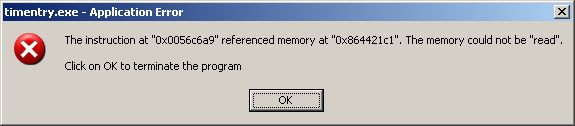
This is a network based application that relies on .Net 1.1 so previous troubleshooting involved removing and reinstalling the .Net dependencies, all to no avail. An important detail was overlooked, though, which would have saved us time and get the issue properly escalated: our user was a timekeeper for another user, who also was running into the same error on their workstation when exiting the application. From this minor detail, we could assume the issue was not workstation or user specific.
Beyond this, I have no insight behind the internal workings of this application. But, that did not mean we cannot turn to the power of the dump to get an idea of what was happening. When you encounter such an error dialog, do not click OK, do not pass go, do not collect $200. Instead dump the crashing process.
After creating a .dmp file, I copied it to my workstation and opened with WinDbg from the Windows Debugging Tools. In the only thread was an important clue in the top frame of the stack (you read threads and stacks going up, so this would be the last routine before crashing): 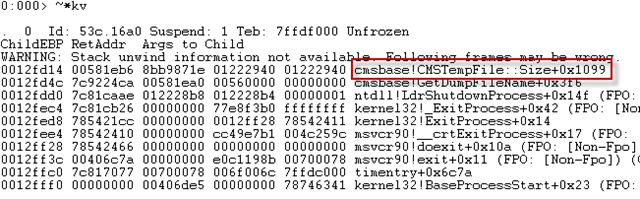
cmsbase is the module and the “!” tells us where the function starts, in this case CMSTempFile Size. Then user heard me muttering to myself this and noted that the attorney’s Subscription List was rather large. Upon escalation to the software developer, this issue was confirmed as a bug with large subscription lists. To correct, the subscription list needed to be shortened (or recreated in cases where it persisted).
Posted in Troubleshooting | Tagged: Dump, WinDbg | Leave a Comment »
The Case of the Print to PDF Hangs
Posted by William Diaz on April 4, 2011
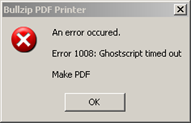
One morning I started hearing a few reports of cases where users were not able to print to the BullZip PDF software printing device. After a wait of 5 minutes, the BullZip printer would return the following error: “An error occurred. Error 1008: Ghostscript timed out – Make PDF”
Read the rest of this entry »
Posted in Troubleshooting | Tagged: Dump, Hang, Process Explorer, WinDbg | Leave a Comment »
The Case of the Email Reply & Forward Hangs
Posted by William Diaz on March 16, 2011
This is another example of where you can use Process Explorer for application hang analysis. In the case here, when replying to a specific email or forwarding it, Outlook 2003 would become unresponsive. To get an idea of what was happening we ran Process Explorer on the user’s workstation and opened the Outlook.exe process properties. From here, we went to the Threads tab, selected the main OUTLOOK .EXE thread and then took a look at the stack: Read the rest of this entry »
Posted in Troubleshooting | Tagged: Hang, Outlook | Leave a Comment »
Outlook Crashes & Outllib.dll
Posted by William Diaz on March 2, 2011
I have seen many an Outlook crash in the desktop support role. Often times, if you go into the Windows Event Viewer and look in the Application logs you will see a corresponding error for Microsoft Office. If you look at the details, you might see that it will point to outllib.dll as the faulting module: 
Often times, this error is being caused by outcmd.dat, the file that stores your toolbar custom settings in Outlook. To see if this resolves the problem with Outlook crashing, close Outlook and go to C:\Documents and Settings\username\Application Data\Microsoft\Outlook and delete this file. Since the crashes can be random, monitor for the problem before assuming it has been corrected. A telltale sign that this file is causing the problem is to check its size. A normal outcmd.dat is between 10-20 kb and anything larger than 100kb should be suspect.
Posted in Troubleshooting | Tagged: Outlook | Leave a Comment »
Understanding and Troubleshooting the Windows Temp Profile
Posted by William Diaz on February 17, 2011
When there is a mismatch between the local profile of a domain user and the network profile, you are going to run into a scenario where the user is logged on with a temp profile. The problem becomes apparent when the user sees only a standard desktop, which is missing their previous saved customizations and personal settings. This profile is created from the Default user account in C:\Documents and Settings\Default User + the settings applied by group policy and logon scripts. When this occurs, it is important to know why so that we can identify the problem and correct it.
When you logon for the first time with a new profile, that profile is created in C:\Documents and Settings\username. As you begin working and personalizing the desktop, programs, Windows appearances, connecting to printers, etc, these settings become a permanent part of your profile. In an environment where roaming profiles are enabled these personalization’s are also written to some network location (e.g. the local office file server) so that they can follow you to other workstations you log on to. Your roaming profile is composed of various folders and files copied from your local profile, e.g. Favorites, Contacts, Application Data, and most importantly ntuser.dat, also known as HKCU, the part of the registry that contains all your configurations. The roaming profile is written to the network profile when you log off each time and any changes made locally are merged to the profile on the network share afterwards. The next time you logon to that workstation, the profile on the local computer and network are compared. If there is a mismatch, then you run into a Windows logon prompt similar to this.
Read the rest of this entry »
Posted in Troubleshooting | Tagged: Malware | 6 Comments »
 Windows Explored