

Boot performance in Windows Vista and 7 has become such a focus that a whole area of the Event Viewer is dedicated to it. Here, you can investigate boot metrics and troubleshoot causes of slow boot up times. You can find these events under Diagnostics-Performance by going to Event Viewer > Applications and Service Logs (this part of the tree will take a few seconds to expand) > Microsoft > Windows. Read the rest of this entry »
Archive for the ‘Troubleshooting Tools’ Category
Examining Windows 7 Boot Performance
Posted by William Diaz on September 7, 2011
Posted in Inside Windows, Troubleshooting, Troubleshooting Tools | Tagged: Performance | 2 Comments »
Unable to Print or Copy and Paste Web Pages
Posted by William Diaz on September 1, 2011
This issue recently came up after a user could no longer print web pages from a site that previously printed fine. The Print Preview and Print options in Internet Explorer rendered a blank page, except for the header and footer information:

When you encounter this, it is often by design. In IE 8 and IE 9 there is a simple way to check if a web page is has been set to restrict printing. Read the rest of this entry »
Posted in Troubleshooting Tools | Tagged: Internet Explorer, Printing | Leave a Comment »
Zero Day Malware Cleaning with the Sysinternals Tools
Posted by William Diaz on August 18, 2011
Slides from Mark’s highly-rated Blackhat US 2011 presentation on how to use the Sysinternals tools to hunt down and eliminate malware.
http://download.sysinternals.com/Files/SysinternalsMalwareCleaning.pdf
Posted in Troubleshooting Tools | Tagged: Autoruns, Malware, Process Explorer, Process Monitor | Leave a Comment »
A GUI for PsTools
Posted by William Diaz on August 4, 2011
One of my co-workers created this graphical user interface for the suite of PsTools from SysInternals.
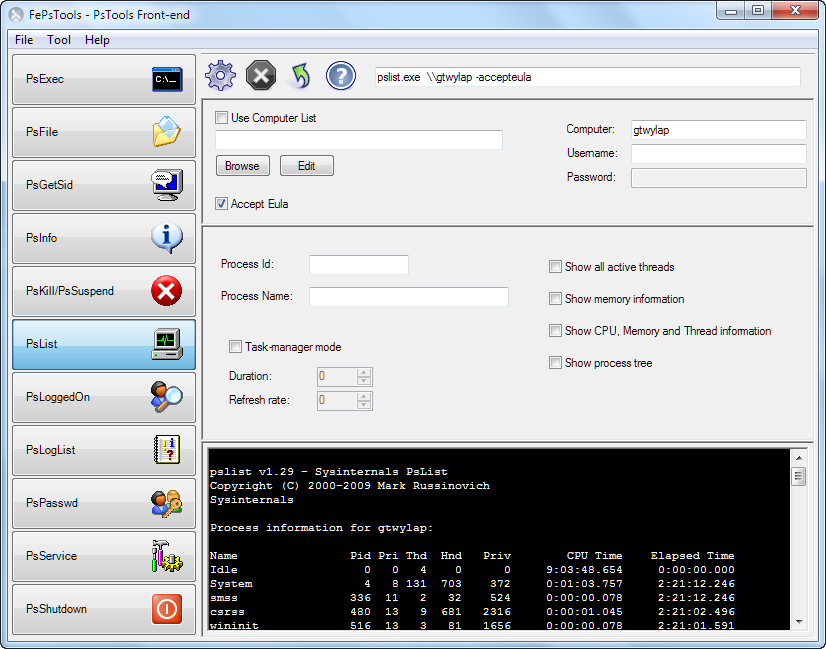
Check it out here: http://www.davitools.com/fepstools/fepstools.aspx
Posted in Troubleshooting Tools | Tagged: PsTools | 1 Comment »
Change Analysis Diagnostic for Windows XP
Posted by William Diaz on August 5, 2010
This is a cool Microsoft utility that allows one to look at what has changed on a PC from a specified date. This comes in handy when you need to troubleshoot a system problem that may be the result of a new or recent app, driver, or update that was recently installed so you can see what has changed on the system since the problem started occurring. The interface is simple and easy enough to use, and when combined with other troubleshooting tools may help isolate the cause. You can read about it and download from here: http://support.microsoft.com/kb/924732.
Note, to run this with Service pack 3, you need to extract the files from self-extracting exe instead of running directly. You can do this by opening with WinZip or the another zip program. Open the scdiag folder and extract statechangediag.exe and scstyle.xls to a folder. Read the rest of this entry »
Posted in Troubleshooting Tools | Leave a Comment »
Outlook 2007/2010 File Delete Quirk
Posted by William Diaz on July 20, 2010
I ran into this one when troubleshooting The Case of the Crashing Email with a different version of Outlook. I created a test folder to save the crashing email message attachments. When I was done, I went to delete the folder and received: “Error Deleting File or Folder. Cannot delete filename. It is being used by another person or program…”
 Read the rest of this entry »
Posted in Troubleshooting, Troubleshooting Tools | Tagged: Outlook, Process Explorer | Leave a Comment »
Advanced Malware Cleaning
Posted by William Diaz on July 18, 2010
This is an excellent webcast by Mark Russinovich on how to use various tools (mainly those from SysInternals) to detect and clean malware. You can find it here: http://technet.microsoft.com/en-us/sysinternals/gg618529
Posted in Troubleshooting, Troubleshooting Tools | Tagged: Malware | Leave a Comment »
Using the Debug Diagnostic 1.1 Tool to Troubleshoot Application Crashes
Posted by William Diaz on July 18, 2010
In cases where the post-mortem default debugger, e.g. Dr Watson in XP, fails to capture a user mode dump of a crashing process or service, you need to be a bit proactive and attach to the crashing application. You can do this a number of ways, such as using ADPlus or WinDbg from the Windows Debugging Tools, but this may not be practical on a user’s workstation (big foot print, invasive, process does not run transparently). Also, the crash may be too random to recreate quickly or at will.
In these circumstances, Debug Diagnostics comes in very useful. It has a small foot print, runs as a Windows service, can be quickly setup via rules, and the GUI can then be closed and left to wait for the target process to crash. Afterwards, a dump can be retrieved from the system remotely, and impact on the user remains minimal. Additionally, Debug Diagnostics can also analyze the dump created and find a solution on-line.
Outlined is a basic setup, attaching Debug Diagnostics to crashing instances of Internet Explorer. In the example here, I am creating a crash rule for a specific process:
Posted in Troubleshooting, Troubleshooting Tools | Tagged: Crash, Dump, Hang | 1 Comment »
The Case of the Temporary Registry Profiles
Posted by William Diaz on July 9, 2010
After getting hooked on Mark Russinovich’s blogs, I came across this, an excellent read: http://blogs.technet.com/b/markrussinovich/archive/2009/08/10/3272210.aspx.
We ran into this issue ourselves and it had everyone stumped until I found this blog post. Demonstrates the power of Process Monitor and specifically the boot logging feature.
Posted in Troubleshooting, Troubleshooting Tools | Tagged: Process Monitor | 1 Comment »
The Case of the Hidden Scheduled Tasks
Posted by William Diaz on July 9, 2010
This case provided a good opportunity to use Sysinternal’s Autoruns to detect and remove some malware that had found its way onto one of our workstations. What was happening was that some unknown process on this workstation was going out to the Internet at the same time every hour and attempting to download a suspicious executable named Zl0.exe and drop in it the local temp folder for the user, which by default is C:\Documents and Settings\username\Local Settings\TEMP\ for Windows XP (actually, we redirect this to a custom folder).
We knew this because our virus protection had been configured to stop all unknown exe files from writing to or starting from from this location. The attempt to download the file was stopped by the host intrusion detection but the process responsible for trying to download it was undetected.
Before starting, I verified Zl0.exe was, in fact, malware by searching it on the Internet. A quick scan of the system’s running processes with Process Explorer didn’t reveal anything out of the ordinary. Since the download was taking place each hour, I assumed the Windows Task Scheduler job was involved. The Task Scheduler is actually a service hosted within svchost.exe, along with many other services, so killing the process was not really practical. Another advantage to relying on the Task Scheduler was that the suspicious process could be started by a legitimate process, run, attempt to do what it wants to do, stop, and when you go to investigate with process monitoring utilities, it is not detected.
To confirm my suspicion, I opened the Task Scheduler. However, there were no abnormal scheduled jobs, even after checking the View Hidden Tasks from the Advanced menu:
Posted in Troubleshooting Tools | Tagged: Autoruns, Malware | Leave a Comment »
 Windows Explored