

While trying to extract the SysInternal PSTools.zip, I was running into the following error: “The Compressed (zipped) Folder is invalid or corrupted.”

Read the rest of this entry »
Posts Tagged ‘Process Monitor’
The Case of the Zip File That Wouldn’t Open
Posted by William Diaz on December 8, 2010
Posted in Troubleshooting | Tagged: Networking, Process Monitor | 2 Comments »
Process (Monitor) of Elimination
Posted by William Diaz on December 2, 2010
The problem presented itself as thus: “Microsoft Visual Basic … Run-time error ‘-2147024894 (800700002)’: Automation Error . The system cannot find the file specified.”

Read the rest of this entry »
Posted in Office, Troubleshooting | Tagged: Process Monitor, Word | 2 Comments »
The Case of the Failed Registry Edit
Posted by William Diaz on October 29, 2010
I like to play with post mortem debuggers to help troubleshoot issues with crashing or hanging application by doing some basic analysis of the dump files. Often times I change the Windows debugger between Dr Watson and WinDbg on my Windows Xp workstations. To make Windbg the default debugger you can go into the command shell and run the following command: Windbg –I. After doing this many times previously, I was surprised when I encountered the following error when trying to change the debugger on my Windows 7 workstation. “WinDbg was not successfully installed as the default postmortem debugger. This operaton requires administrative privileges.”
Read the rest of this entry »
Posted in Troubleshooting | Tagged: Anti-Virus, Process Monitor | 2 Comments »
User Request – Get Rid of IE’s “Security Information” Prompt for Secure Sites
Posted by William Diaz on September 1, 2010
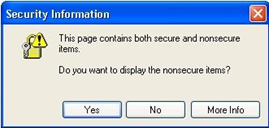
I’m always eager to learn some Internals, whether its Windows, Office or Internet Explorer. A request from one of our high-profile user provided me this chance. She wanted me to prevent the following message prompt from appearing when she visited secure sites (she did this a lot as part of her work): “This page contains both secure and nonsecure items. Do you want to display the non secure items?”
 Read the rest of this entry »
Posted in Uncategorized | Tagged: Internet Explorer, Process Monitor | Leave a Comment »
The Case of the IE Print Failures
Posted by William Diaz on August 26, 2010
I was asked to assist when one of user’s was unable to perform the simple, mundane task of printing a web page in Internet Explorer. Furthermore, they could not even print preview the page. There was no error of any kind and IE simply went on with its business like nothing happened. I started my analysis by running Process Monitor on the workstation, creating a filter in the trace log for iexplore.exe. I then repeated the steps of the user by going to File > Print Preview and then stopped the trace log. There were just over 500 events logged in that one action, small enough that I was quickly able to scroll through it and I some Access Denied results: Read the rest of this entry »
Posted in Troubleshooting | Tagged: Internet Explorer, Printing, Process Monitor | Leave a Comment »
Process Monitor & the BSOD
Posted by William Diaz on August 24, 2010
Very rarely do I ever experience a Blue Screen of Death. In fact, I can’t recall the last time I did, so it was worth taking a photo of:
 Read the rest of this entry »
Posted in Troubleshooting | Tagged: BSOD, Crash, Dump, Process Monitor | 2 Comments »
The Case of the Persistent Logon Prompt
Posted by William Diaz on August 19, 2010
While trying to open an application on her workstations, our user was encountering a logon prompt each time:

Entering her logon info failed to get pass the logon prompt. Clicking Cancel also did not dismiss the prompt and it remained stuck here. The tech handling the call was about to give up and have the application reinstalled, but I was asked to take a look for a second opinion. Read the rest of this entry »
Posted in Troubleshooting | Tagged: Process Monitor | Leave a Comment »
The Case of the Temporary Registry Profiles
Posted by William Diaz on July 9, 2010
After getting hooked on Mark Russinovich’s blogs, I came across this, an excellent read: http://blogs.technet.com/b/markrussinovich/archive/2009/08/10/3272210.aspx.
We ran into this issue ourselves and it had everyone stumped until I found this blog post. Demonstrates the power of Process Monitor and specifically the boot logging feature.
Posted in Troubleshooting, Troubleshooting Tools | Tagged: Process Monitor | 1 Comment »
 Windows Explored