
Sometimes the user is just wrong and you can’t give them any other choice but to admit it.


Posted by William Diaz on May 8, 2012
Sometimes the user is just wrong and you can’t give them any other choice but to admit it.
Posted in Uncategorized | Leave a Comment »
Posted by William Diaz on May 7, 2012
One of our helpdesk technician’s in a remote office reached out to me recently and asked me to assist with an application that suddenly started crashing on him with the following error: “Microsoft Visual C++ Runtime Library. Runtime Error! This application has requested the Runtime to terminate it in an unusual way…” 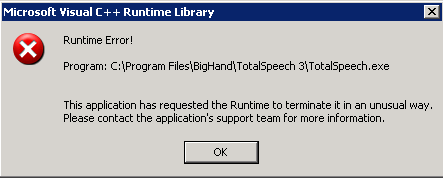
Posted in Troubleshooting, Troubleshooting Tools | Tagged: Crash, Dump, Process Monitor, WinDbg | 1 Comment »
Posted by William Diaz on May 7, 2012
I recently put together a quad core system from parts my brother was retiring from his home system. Soon after getting everything up and running, the new system would sometimes hard hang while working via VPN. A hard hang is when the OS becomes completely unresponsive but is still running. I had earlier prepared myself for the next instance of this encounter by enabling CrashOnCtrlScroll in the Windows registry so that the next time it happened I could manually crash the system from the keyboard and examine the memory dump with WinDbg for signs of the responsible culprit. You can read about how to enable this option in this earlier blog Forcing a System Crash on an Unresponsive PC.
Upon opening a kernel dump, the analyze –v command is a clickable hyperlink1.
Posted in Troubleshooting | Tagged: Crash, Dump, Hang, WinDbg | 1 Comment »
Posted by William Diaz on May 2, 2012
A couple weeks ago a co-worker asked me if it was possible to recover text from a hung application. The user had spent a good amount of time typing into text field and upon trying to submit the information, IE became hung and would not recover. The user didn’t want to have to retype everything from scratch again. The short answer to this is yes. The long answer is “Yes, if you can be patient.” I have never actually needed to perform this myself because it’s not always that practical and, to be honest, the task can be somewhat tedious. But if you really need to recover text and Word didn’t auto-recover or Outlook lost the draft after you clicked send, or IE is in the process of a “GUI crash”, then turn to the power of the dump.
The idea here is if the application is still running but stalled, it still resides in memory, along with anything you typed into it. When you dump the process, you are dumping its presence in memory to a file that you can pick apart. Dumping a hung process is simple enough. On an XP system, open Process Explorer, right-click the process, and choose Create Dump. In Vista & Windows 7, this option is now built into the Task Manager. You can then copy the dump to a system where WinDbg is installed to open it.
Posted in Troubleshooting Tools | Tagged: Dump, Hang, WinDbg | Leave a Comment »
Posted by William Diaz on May 1, 2012
I often find myself running Process Monitor and Process Explorer on user workstations. But to get the most of either of these tools, you really need to configure symbols so you can accurately read thread and stack information when doing a deeper analysis of a process. This can often be a nuisance because I am a cut and paste type of guy and even after doing it numerous times, I still have trouble recalling the Microsoft symbol path. On top of that, many times I run these tools with the user connected so speed is a necessity. To work around that, I decided to write a small script that I can run from a file server that will do it for me. Run the script before your start either tool.
There is one prerequisite, however: you need the full dbghelp.dll from the Windows Debugging Tools as the debug help DLL in system32 is not sufficient. If you are running on both 32 and 64 bit systems, you will need to get both the 64 bit and 32 bit versions. Store them away on network share and modify the script below to look to that share. In my case, we are still a mixed environment so I renamed the 32 bit dbghelp to dbghelp32.dll while the 64 bit version remains unchanged and created two different scripts. The respective DLL will copied into a folder C:\DbgHelp on the local system .
I also added a 5 second duration for new open and close processes and threads.
|
const HKEY_CURRENT_USER = &H80000001 strValueName = "DbgHelpPath" strValueName = "SymbolPath" strValueName = "HighlightDuration" ‘Process Monitor 64 strKeyPath = "Software\Sysinternals\Process Monitor" strValueName = "DbgHelpPath" strValueName = "SymbolPath" ‘Copy full dbghelp.dll 64 bit to folder DbgHelp. Set oFSO = CreateObject("Scripting.FileSystemObject") Set FSO = CreateObject("Scripting.FileSystemObject") |
Posted in Troubleshooting Tools | Tagged: Process Explorer, Process Monitor | Leave a Comment »
Posted by William Diaz on May 1, 2012
The problem starts after the user has had their Windows profile recreated but continues to experience some Outlook performance issues. Each time she clicks the New button in Outlook to create a new message, there is a 5 to 10 second delay before the blank message opens. There is also a 10+ second delay after she clicks send and Outlook becomes unresponsive for that time. I connect to her and quickly look at the Office Outlook registry for any unapproved 3rd party add-ins and see nothing out of the ordinary. I decide to dump the Outlook process when the hang is encounter and turn to Process Explorer. This is a simple matter of right-clicking the process and choosing Create Dump when it is in an unresponsive state. Actually, I collect two dumps, the other with Procdump in hang mode. I do this to ensure that the dumps are consistent; if the dumps are not similar then I may need to collect more until a pattern emerges.
I copied the dumps to my workstation and opened them with WinDbg and run the !analyze –v –hang command. The stack for both dumps are similar. With the exception of the NRTExchn component (our DMS add-in for Outlook), these are all MS modules. Normally, this wouldn’t excite me but something stands out like a sore thumb as I move up the stack, the presence of msi.dll in the stack of the current examine thread.
Posted in Office, Troubleshooting, Troubleshooting Tools | Tagged: Hang, Outlook, Process Explorer, Process Monitor, WinDbg | Leave a Comment »
Posted by William Diaz on April 19, 2012
Most of the day I am connected to a lab or another workstation through Remote Desktop. Often times I need to copy (or cut) and paste from the remote desktop session. And sometimes this just straight out fails. When this happens, it’s usually just a simple matter of killing the rdpclip.exe process on the remote system and restarting it. If I am unable to copy (or cut) to the remote session, then I make sure to check that rdpclip process in running. If it is, then I need to close the session and reconnect to correct.
Often, the issue being encountered is caused by the so-called viewer chain. I found an old MSDN blog on the issue here: Why does my shared clipboard not work? (Part 1) & Why does my shared clipboard not work? (Part 2). Vista and up have done more to mitigate these issues.
As for why the clipboard stops working locally, it a shared service so probably some application has it opened and will not let go. In that case, your best bet is to start closing suspect applications until it works again (no straight forward ways I know of for identifying the guilty process).
Posted in Inside Windows | Leave a Comment »
Posted by William Diaz on April 5, 2012
This might present itself as a generic IE error: “Internet Explorer cannot open the Internet site <URL>. Operation aborted” 
You will need to check the option to Display a notification about every script error in the Tools > Internet Options > Advanced tab to see the details as this dialog box will prevent the error from being revealed otherwise. Afterwards, reload the page and you should see the details: “Could not complete the operation due to error 800a03e8.” 
Cumulative Security Update for Internet Explorer 8 for Windows XP (KB2618444) should address this issue, as well as various other javascript issues with IE7 and IE8. It also addresses the HTML Parsing error blogged about earlier here: HTML Parsing Error
Posted in Uncategorized | Tagged: Internet Explorer | Leave a Comment »
Posted by William Diaz on April 4, 2012
While running Process Monitor on my primary workstation, I noticed repetitive registry operations coming from Citrix Receiver application on the same keys: 
How repetitive? 13,000+ registry operations per minute on my idle workstation with no active Citrix connections: 
This applies to the Windows 7 client. I don’t see the same activity for the Windows XP client.
I recalled a reading in the Windows Internals 5th Edition:
“Because the registry implements the RegNotifyChangeKey function that applications can use to request notification of registry changes without polling for them, when you launch Process Monitor on a system that’s idle you should not see repetitive accesses to the same registry keys or values. Any such activity identifies a poorly written application that unnecessarily affects a system’s overall performance.”
I don’t know the internals of the Receiver application, but this leaves me wondering if there is some room for improvement by implementing RegNotifyChangeKey to make it less “noisy”.
Posted in Uncategorized | Tagged: Performance, Process Monitor | Leave a Comment »
Posted by William Diaz on April 4, 2012
In addition to local processes locking up files and preventing their usage by other processes, files can also become locked by remote processes, too. Finding the remote system that has a handle(s) on the file can be a little bit more more involved. I mean this literally: a little a bit more involved. Knowing which tools to use or where to look can make this task just as simple as isolating it to a local process as outlined in part I.
This example is a recreation of an issue I encountered while working on a workstation remotely. It manifested itself as a failure to logon as the user: “Windows cannot load the locally stored profile…”
Posted in Troubleshooting Tools | Tagged: Process Explorer, TCPView | 1 Comment »
 Windows Explored