

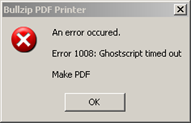
One morning I started hearing a few reports of cases where users were not able to print to the BullZip PDF software printing device. After a wait of 5 minutes, the BullZip printer would return the following error: “An error occurred. Error 1008: Ghostscript timed out – Make PDF”
Read the rest of this entry »
The Case of the Print to PDF Hangs
Posted by William Diaz on April 4, 2011
Posted in Troubleshooting | Tagged: Dump, Hang, Process Explorer, WinDbg | Leave a Comment »
The Case of the Email Reply & Forward Hangs
Posted by William Diaz on March 16, 2011
This is another example of where you can use Process Explorer for application hang analysis. In the case here, when replying to a specific email or forwarding it, Outlook 2003 would become unresponsive. To get an idea of what was happening we ran Process Explorer on the user’s workstation and opened the Outlook.exe process properties. From here, we went to the Threads tab, selected the main OUTLOOK .EXE thread and then took a look at the stack: Read the rest of this entry »
Posted in Troubleshooting | Tagged: Hang, Outlook | Leave a Comment »
Outlook OST Size vs. Exchange Mailbox Size
Posted by William Diaz on March 14, 2011
You may (or may not) have noticed that the local cached mailbox for Outlook, also known as the OST file, is larger than the Exchange mailbox size. There is no shortage of misinformation about this topic, some of it incorrectly attributing this to corruption1. For example, the mailbox seen here in Exchange is only 132 MBs:
Read the rest of this entry »
Posted in Office | Tagged: Exchange, Outlook | Leave a Comment »
Outlook Crashes & Outllib.dll
Posted by William Diaz on March 2, 2011
I have seen many an Outlook crash in the desktop support role. Often times, if you go into the Windows Event Viewer and look in the Application logs you will see a corresponding error for Microsoft Office. If you look at the details, you might see that it will point to outllib.dll as the faulting module: 
Often times, this error is being caused by outcmd.dat, the file that stores your toolbar custom settings in Outlook. To see if this resolves the problem with Outlook crashing, close Outlook and go to C:\Documents and Settings\username\Application Data\Microsoft\Outlook and delete this file. Since the crashes can be random, monitor for the problem before assuming it has been corrected. A telltale sign that this file is causing the problem is to check its size. A normal outcmd.dat is between 10-20 kb and anything larger than 100kb should be suspect.
Posted in Troubleshooting | Tagged: Outlook | Leave a Comment »
Understanding and Troubleshooting the Windows Temp Profile
Posted by William Diaz on February 17, 2011
When there is a mismatch between the local profile of a domain user and the network profile, you are going to run into a scenario where the user is logged on with a temp profile. The problem becomes apparent when the user sees only a standard desktop, which is missing their previous saved customizations and personal settings. This profile is created from the Default user account in C:\Documents and Settings\Default User + the settings applied by group policy and logon scripts. When this occurs, it is important to know why so that we can identify the problem and correct it.
When you logon for the first time with a new profile, that profile is created in C:\Documents and Settings\username. As you begin working and personalizing the desktop, programs, Windows appearances, connecting to printers, etc, these settings become a permanent part of your profile. In an environment where roaming profiles are enabled these personalization’s are also written to some network location (e.g. the local office file server) so that they can follow you to other workstations you log on to. Your roaming profile is composed of various folders and files copied from your local profile, e.g. Favorites, Contacts, Application Data, and most importantly ntuser.dat, also known as HKCU, the part of the registry that contains all your configurations. The roaming profile is written to the network profile when you log off each time and any changes made locally are merged to the profile on the network share afterwards. The next time you logon to that workstation, the profile on the local computer and network are compared. If there is a mismatch, then you run into a Windows logon prompt similar to this.
Read the rest of this entry »
Posted in Troubleshooting | Tagged: Malware | 6 Comments »
The Case of the Unknown Network Traffic
Posted by William Diaz on February 14, 2011
If you enable “Show icon in the notification area when connected” for your LAN or other network device, a small icon will blink on and off in the system tray, which gives you a simple visual indication of network activity.

One day I noticed that this icon was solid … always. I double-clicked on the icon to see the number of packets passing to and from the Local Area Connection. Read the rest of this entry »
Posted in Troubleshooting | Tagged: Networking | 2 Comments »
The Case of the Offline Chat
Posted by William Diaz on February 10, 2011
Among the various types of operations Process Monitor traces, TCP/UDP activity is often overlooked. If you want to examine packets, Process Monitor is not going to do it for you. But it can sometimes present some important clues to a problem and point you in the right direction.
In the case here, our user was not able to get our in-house chat program to go online. You can usually force this by selecting the “List” button, but after several seconds of “Loading…” it would go back to offline. In hopes of finding something revealing, I opened Process Monitor from our lab and set a filter for the executable of the chat program. There were only a dozen operations but the ones that stood out were the last 5 UDP Send operations.
Read the rest of this entry »
Posted in Troubleshooting | Tagged: Networking, Process Monitor | Leave a Comment »
IE’s index.dat
Posted by William Diaz on February 10, 2011
I find myself working remotely on various issues all the time. Often, it is quite late and there is no line of communication with the affected user (and sometimes the technician that escalated the issue). That was the case recently. I needed to obtain an unpublished secure URL to a login portal to recreate and correct a problem. This information should have been included in the incident but was not. In our IT environment, we enforce “Empty Temporary Internet Files folder when browser is closed” through group policy; additionally, earlier troubleshooting had resulted in the IE History and Cookies being deleted. As a result, I would not be able to go through any of the files stored in the temporary Internet folder to find the URL I was looking for.
Well, that’s not entirely true. Read the rest of this entry »
Posted in Uncategorized | Tagged: Internet Explorer | Leave a Comment »
The Case of the Word Open Document Delays
Posted by William Diaz on February 4, 2011
After a certain amount of time troubleshooting Word issues (not document issues) in a large enterprise environment that uses several templates, macros, and other add-ins, one develops a troubleshooting drill. This normally involves isolating a problem to a startup template or add-in. We have a lot of them and they are always increasing. For Office Word 2003, you can find most of these in C:\Program Files\Microsoft Office\OFFICE11\STARTUP:
Read the rest of this entry »
Posted in Office | Tagged: Hang, Word | Leave a Comment »
Outlook .dat Files
Posted by William Diaz on February 4, 2011
Knowing what the Outlook 2003 .dat file do can often assist’s you with troubleshooting Outlook issues. The primary .dat files are: Read the rest of this entry »
Posted in Office | Tagged: Outlook | Leave a Comment »
 Windows Explored