Windows Explored

Everyday Windows Desktop Support, Advanced Troubleshooting & Other OS Tidbits

Archive for the ‘Uncategorized’ Category

IE’s index.dat

Posted by William Diaz on February 10, 2011


I find myself working remotely on various issues all the time. Often, it is quite late and there is no line of communication with the affected user (and sometimes the technician that escalated the issue). That was the case recently. I needed to obtain an unpublished secure URL to a login portal to recreate and correct a problem. This information should have been included in the incident but was not. In our IT environment, we enforce “Empty Temporary Internet Files folder when browser is closed” through group policy; additionally, earlier troubleshooting had resulted in the IE History and Cookies being deleted. As a result, I would not be able to go through any of the files stored in the temporary Internet folder to find the URL I was looking for.

Well, that’s not entirely true. Read the rest of this entry »
Posted in Uncategorized | Tagged: | Leave a Comment »

AIM Network Logging Reveals Windows Passwords

Posted by William Diaz on January 27, 2011


I was asked to troubleshoot a user’s connectivity issues with AIM. I am not too enthusiastic about anything AOL related but I would look anyway. One of the things I wanted to do was see if AIM had some internal network logging built into it. Starting with version 7.5.8.2 there is an option that resides under Settings > Connection that enables diagnostic network logging. Read the rest of this entry »

Posted in Uncategorized | Tagged: , | Leave a Comment »

Too(L)ManyBars

Posted by William Diaz on December 30, 2010


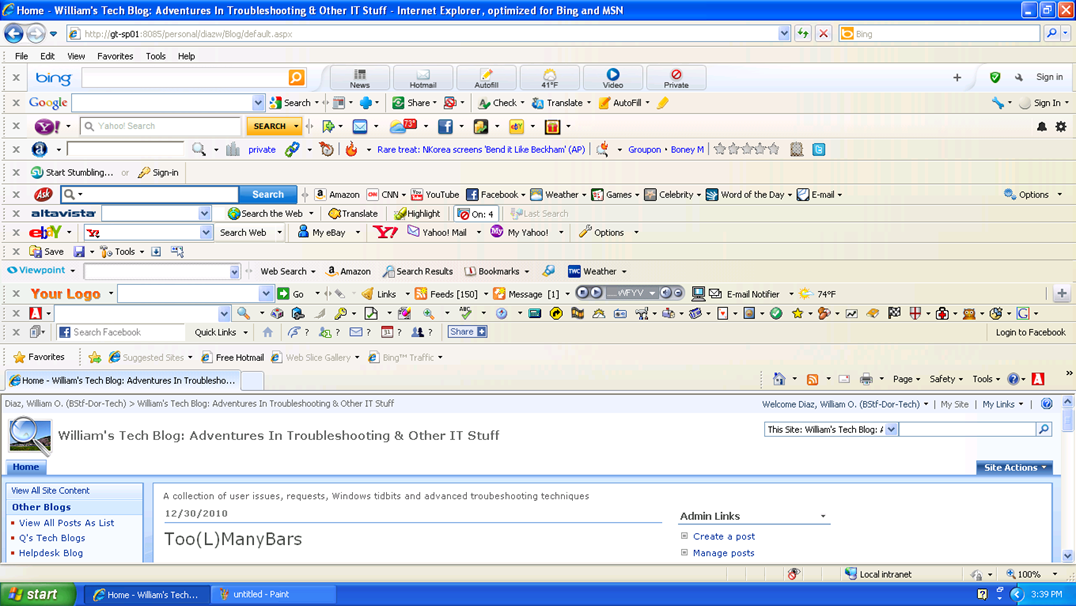
I have run into quite a few IE environments in my time, often cluttered with annoying toolbars. Although I frown upon too many toolbars in any browser, I decided to see how many toolbars I could install in IE before I got tired. To isolate this potentially unstable environment, I started Windows XP mode from my Windows 7 system and after 45 minutes achieved the following:

Now begins the process of removing the toolbars.

Posted in Uncategorized | Tagged: | Leave a Comment »

Just Because You Are Using Debugging Tools Doesn’t Mean You Are Debugging

Posted by William Diaz on December 22, 2010


One of my saucy co-workers asked why were we using the various debugging tools (WinDbg, Adplus, Debug Diagnostics) to resolve issues with crashing apps. This turned into a debate, mostly over semantics, because were not actually resolving issues using these tools, at least not directly. It should be pointed out that just because you use debugging tools does not imply that you are debugging. The process of debugging means to remove the bugs from program code. That’s not what I (or we) are using the debugging tools for. For that, we would need access to the source code; and even if we had access to it we are not professional programmers and lack the experience to correct buggy code.

The main purpose of using these tools in our capacity is to diagnose an application hang or crash when the normal troubleshooting techniques fail. The goal is to identify the component or module causing the hang or crash and then work around it by either upgrading (or downgrading), disabling, or removing the app, and hopefully it is not a mission critical app. If it is a mission critical app, then further escalation needs to take place that involves the developer and you can provide your crash/hang dumps to them for analysis.

In the end, what you have done is used these tools for Basic Crash or Hang Analysis. This is where your job is complete and someone else’s begins.

Posted in Uncategorized | Leave a Comment »

CRC & Bad Blocks

Posted by William Diaz on December 3, 2010


Its actually refreshing when I come across a problem that does not always manifest itself as  GUI error in Windows, or even a software problem for that matter. If, when trying to boot into Window, it fails to load in a timely manner or not load at all, try starting in SafeMode (F8). You should being able to see which system files are being loaded and, in cases where the file system and hard disk where it resides are having problems. you may get lucky (well, lucky in the sense that you can decipher what may be happening). For example, in the case of a laptop I was asked to diagnose it would hang at : “Loaded: \Windows\System32\drivers\crcdisk.sys
Read the rest of this entry »

Posted in Uncategorized | Tagged: | 2 Comments »

User Request – Get Rid of IE’s “Security Information” Prompt for Secure Sites

Posted by William Diaz on September 1, 2010


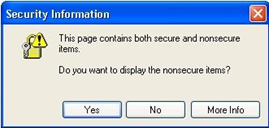
I’m always eager to learn some Internals, whether its Windows, Office or Internet Explorer. A request from one of our high-profile user provided me this chance. She wanted me to prevent the following message prompt from appearing when she visited secure sites (she did this a lot as part of her work): “This page contains both secure and nonsecure items. Do you want to display the non secure items?
Read the rest of this entry »

Posted in Uncategorized | Tagged: , | Leave a Comment »

Windows System State Analyzer

Posted by William Diaz on August 23, 2010


I blogged earlier about a Microsoft comparison tool, the Change Analysis Diagnostic for Windows XP. The idea there was to go back to a specified date and look at what had changed on the system to help troubleshoot any potential issues occurring as the result of installed software. You can read about it here.

The Windows System State Analyzer works with later versions of Windows but is different in that you take a snapshot of the pre-install environment, install the application and then take a post-install snapshot of the same system. When complete, you can then run a comparison of the two files from within the System State Analyzer to see what has changed.

To obtain the tool, go to http://go.microsoft.com/fwlink/?LinkID=140110 (x86) or http://go.microsoft.com/fwlink/?LinkID=140109 (x64). Read the rest of this entry »

Posted in Uncategorized | Leave a Comment »

User Request – Automatically Insert Current Date Into PDF

Posted by William Diaz on August 20, 2010


What the user wants, the user gets. Especially when they tell you someone else has it or someone smarter than you did this for them a long time ago. The request here was to automatically populate several date fields in a PDF with the current date and time the PDF was opened. The idea was to expedite the filling out of the form so that it could quickly be printed out and sent out for hand delivery. 

Most PDF editing apps can accomplish with a little Java script. In the example here, I am using the PDF Converter Professional application but the steps below are similar for Adobe Acrobat or any other PDF editor. The task is to link the Java script to the various text date fields. By default, the text fields are named Text1, Text2, etc. or they can be renamed.

Once you know the field name, go to Document > JavaScript > Document JavaScripts > Add. Read the rest of this entry »

Posted in Uncategorized | Tagged: | Leave a Comment »

Troubleshooting IE Load Times from Manage Add-ons

Posted by William Diaz on August 18, 2010


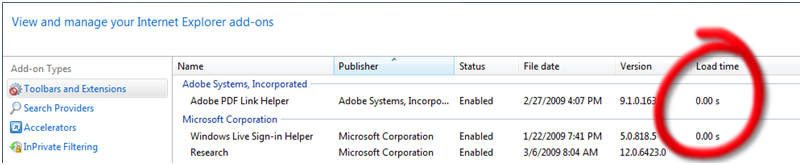
This is available only in IE 8 (and eventually IE 9). If IE is taking too long to start up, one of the things you can do to troubleshoot this is to go into Manage Add-ons from Tools > Internet Options > Programs and check the Load time column for the various toolbars and extensions:


UPDATE

Since writing this, IE9 Beta has been released and it will automatically inform you when an add-on takes too long to load. This is known as the Add-on Performance Advisor. The threshold has been set to 0.2 seconds. Anything taking longer and you will be advised by IE. Read here for further details.

Posted in Uncategorized | Tagged: | Leave a Comment »

Stop Sending Your Web Browsing Analytics to Google

Posted by William Diaz on August 17, 2010


Google offers a browser add-on that prevents them from collecting data on the web sites you visit. However, you can do this in IE natively, without the need of Google’s add-on.

  1. In Internet Explorer, open the Tools menu and click Internet Options.
  2. Click the Security tab and then click the Restricted Sites icon.
  3. Click the Sites button.
  4. In the box at the top, add *.google-analytics.com and push the Add button.
  5. Click the Close button, and then the OK button to dismiss Internet Options.

See the TechNet IEBlog here for details.

Posted in Uncategorized | Tagged: | Leave a Comment »