

In Windows XP, if you have Dr Watson set as your post-mortem default debugger (by default it is) it usually does a good job at catching exceptions when the Windows print spooler, spoolersv.exe, crashes*. Most print spooler crashes are the result of a print driver. Finding the problem print driver is a simple matter of going into the drwtsn32.log and finding the thread that contains the FAULT, literally:
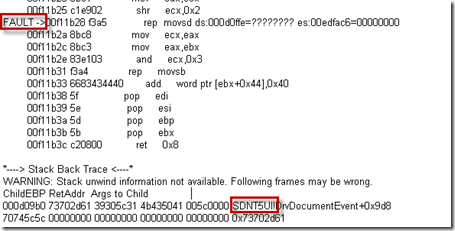
A user.dmp is also created in the DrWatson folder. This dump file offers more details and confirms it is a print driver but requires the Windows Debugging Tools to analyze. Resort to the user.dmp if the log is not revealing enough: Read the rest of this entry »
Archive for May 12th, 2011
Associating a Crashing Print Driver to a Printer
Posted by William Diaz on May 12, 2011
Posted in Troubleshooting | Tagged: Crash, Dr Watson, Printing | Leave a Comment »
 Windows Explored